✅ Future-proofBuilt to keep working — even if the maker walks away.
It works locally over Z-Wave, so it keeps running even if Everspring shuts down the app or the servers. Nothing here ties you to a single company's survival.
Works locally over Z-Wave — keeps running without the maker's cloud
Still in production
Based on how this device connects (local vs. cloud), whether it’s still sold and supported, and its app / subscription. A guide, not a guarantee.
Connectivity
Z-Wave
Prices
No prices yet — be the first to add one.
Community tags
Be the first to tag this page — tags appear right away. Try a theme, capability, or subject (e.g. WWII, heist, slow burn, time travel, A24).
Community photos
Photos from members
No member photos yet.
Reviews
What members say
Sign in to rate Universal module with 3 In 3 Out and share a photo.
No reviews yet.
Community
Be the first to start a thread about Universal module with 3 In 3 Out
Threads post into the Everspring community forum.
Sign in to start a thread in the Everspring community.
Edit history
Loading edit history…
Certified
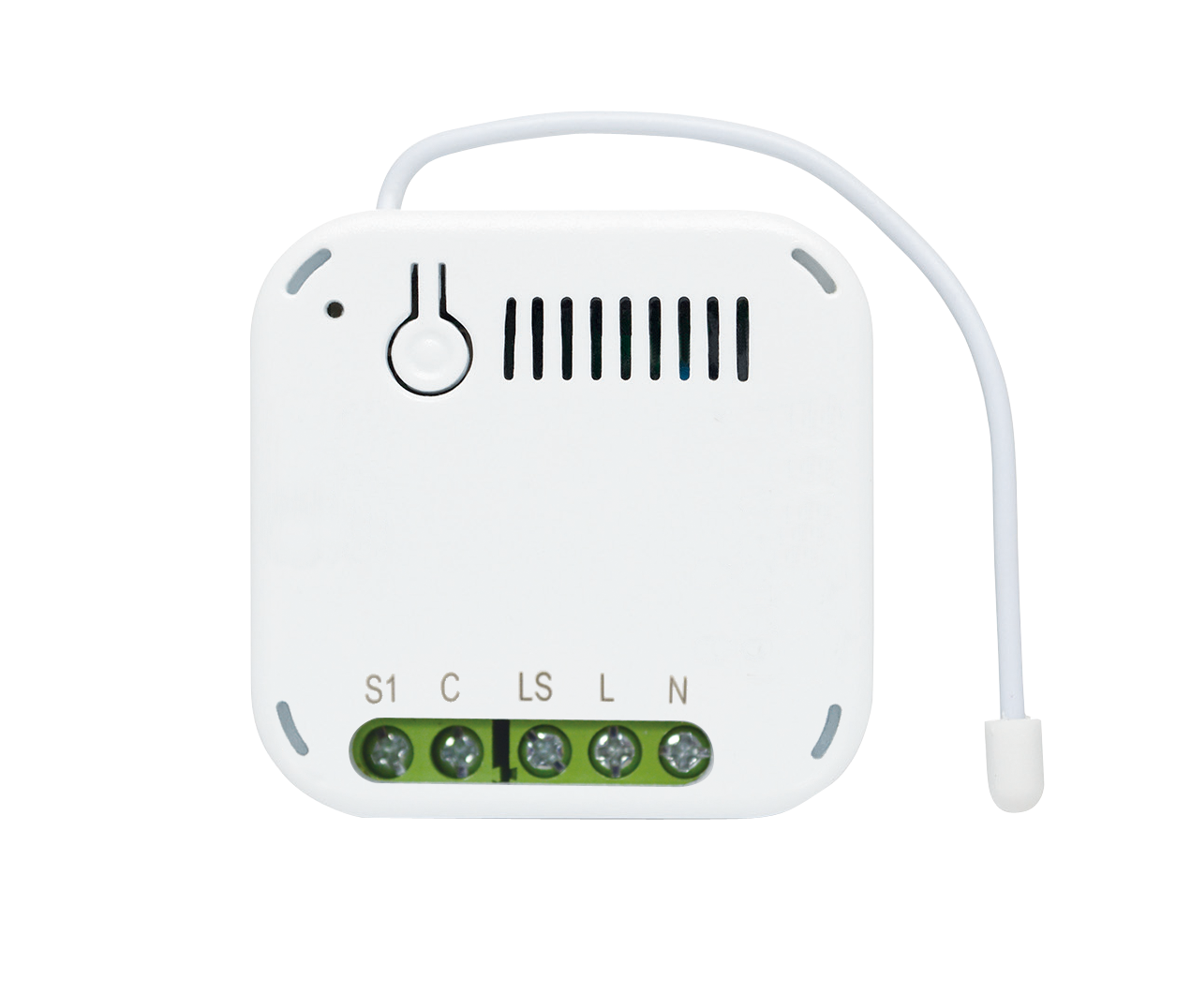
The Universal Module is used to translate wired products into wireless Z-WaveTM protocol, integrating them into the Z-Wave network of a smarthome environment. It has 3 sets of input terminals and 3 sets of relay output. Through the Universal Module, the Z-Wave Controller can read the input signal from wired sensors and control the output of wired actuators. This product can be operated in any Z-Wave network with other Z-Wave certified devices from other manufactures. All mains operated nodes within the network will act as repeater regardless of vender to increase reliability of the network.
Want to buy adds it to your wish list and follows Everspring for updates. I own it adds it to your collection.
The Universal Module is used to translate wired products into wireless Z-WaveTM protocol, integrating them into the Z-Wave network of a smarthome environment. It has 3 sets of input terminals and 3 sets of relay output. Through the Universal Module, the Z-Wave Controller can read the input signal from wired sensors and control the output of wired actuators. This product can be operated in any Z-Wave network with other Z-Wave certified devices from other manufactures. All mains operated nodes within the network will act as repeater regardless of vender to increase reliability of the network.
Hardware platform
SD3502
Short description
The Universal Module is used to translate wired products into wireless Z-WaveTM protocol, integrating them into the Z-Wave network of a smarthome environment. It has 3 sets of input terminals and 3 sets of relay output.
Product identifier
SA301-1
Countries / regions
European Union
Supports smart start
Yes
Certification number
ZC10-20056913
Radio range z wave (m)
40
Configuration parameters
Parameter Number Name Description Format Size Min Value Max Value Default Value Parameter Values 3
Supports explorer frames
Yes
Supported command classes
Identifier Name Key Version COMMAND_CLASS_CONFIGURATION_V4
Controlled command classes
Identifier Name Key Version COMMAND_CLASS_BASIC
Supported multilevel sensors
Multilevel Sensor Type Voltage
Supported notification types
Notification Type Event / State Access Control
Value 4 battery type value aaa 1.5 v color value white firmware updatable value updatable by consumer by rf association groups
Group Number Maximum Nodes Supported End Point ID Group Name Description 1
From to description 0 255 size =1, default value = 0x b4 (off after 180 secs) step of 1 sec, ‘0’ = remain on 11 in3 mode tell the device to active in3 mode 2 1 0 255 64 from to description 0 255 same as for in1 bit 7:corresponds to values in config 14, 15 4 in1 hi threshold voltage trigger level high threshold voltage level for trigger on (or trigger off, depending on mode). 2 1 0 255 25 from to description 0 255 size =1, default value = 0x19 (in1 trigger off when over 2500m v). step of 100m v. 6 in2 mode tell the device to active in2 mode 2 1 0 255 64 from to description 0 255 same as for in1 bit 7:corresponds to values in config 9, 10 10 in2 low threshold voltage trigger level low threshold voltage level for trigger on (or trigger off, depending on mode) 2 1 0 255 10 from to description 0 255 size =1 default value = 0x0 a (in2 trigger on when under 1000m v) 5 in1 low threshold voltage trigger level low threshold voltage level for trigger on (or trigger off, depending on mode). 2 1 0 255 10 from to description 0 255 size =1 default value = 0x0 a (in1 trigger on when under 1000m v) 7 out2 relay trigger on time relay 2 turn on period 2 1 0 255 5 from to description 0 255 size =1, default value = 0x05 (500ms) step of 100ms, ‘0’ = remain on 9 in2 hi threshold voltage trigger level high threshold voltage level for trigger on (or trigger off, depending on mode). 2 1 0 255 25 from to description 0 255 size =1, default value = 0x19 (in2 trigger off when over 2500m v). step of 100m v. 8 group 3 turn on time when triggered by in2 group 3 turn on period 2 1 0 255 180 from to description 0 255 size =1, default value = 0x b4 (off after 180 secs) step of 1 sec, ‘0’ = remain on 1 in1 mode tell the device to active in1 mode 2 1 0 255 64 from to description 0 255 size =1, default value = 0x40 bit 7:corresponds to values in config 4, 5 0 = trigger on when voltage under low threshold, trigger off when over hi threshold 1 = trigger on when voltage over hi threshold, trigger off when under low threshold bit 6:in1 3.3 v pull high on/off , 0 = off, 1 = on bit 5 4 : fixed at 0. bit 3:1 = activate out3 relay when in1 trigger bit 2:1 = activate out2 relay when in1 trigger bit 1:1 = activate out1 relay when in1 trigger bit 0:fixed at 0. 2 out1 relay trigger on time relay 1 turn on period 2 1 0 255 5 from to description 0 255 size =1, default value = 0x05 (500ms) step of 100ms, ‘0’ = remain on 17 tamper mode 0: no activate relay out 1: activate out1 relay when tamper 2: activate out2 relay when tamper 3: activate out1 & out2 relay when tamper 4: activate out3 relay when tamper 5: activate out1 & out3 relay when tamper 6: activate out2 & out3 relay when tamper 7: activate out1 & out2 & out3 relay when tamper 2 1 0 7 0 from to description 0 7 size =1, default value = 0x00 bit 3:1 = activate out3 relay when tamper bit 2:1 = activate out2 relay when tamper bit 1:1 = activate out1 relay when tamper texts