✅ Future-proofBuilt to keep working — even if the maker walks away.
It works locally over Z-Wave, so it keeps running even if FIBARO shuts down the app or the servers. Nothing here ties you to a single company's survival.
Works locally over Z-Wave — keeps running without the maker's cloud
Still in production
Based on how this device connects (local vs. cloud), whether it’s still sold and supported, and its app / subscription. A guide, not a guarantee.
Connectivity
Z-Wave
Prices
No prices yet — be the first to add one.
Community tags
Be the first to tag this page — tags appear right away. Try a theme, capability, or subject (e.g. WWII, heist, slow burn, time travel, A24).
Community photos
Photos from members
No member photos yet.
Reviews
What members say
Sign in to rate FIBARO Flood Sensor and share a photo.
No reviews yet.
Community
Be the first to start a thread about FIBARO Flood Sensor
Threads post into the FIBARO community forum.
Sign in to start a thread in the FIBARO community.
Edit history
Loading edit history…
Certified
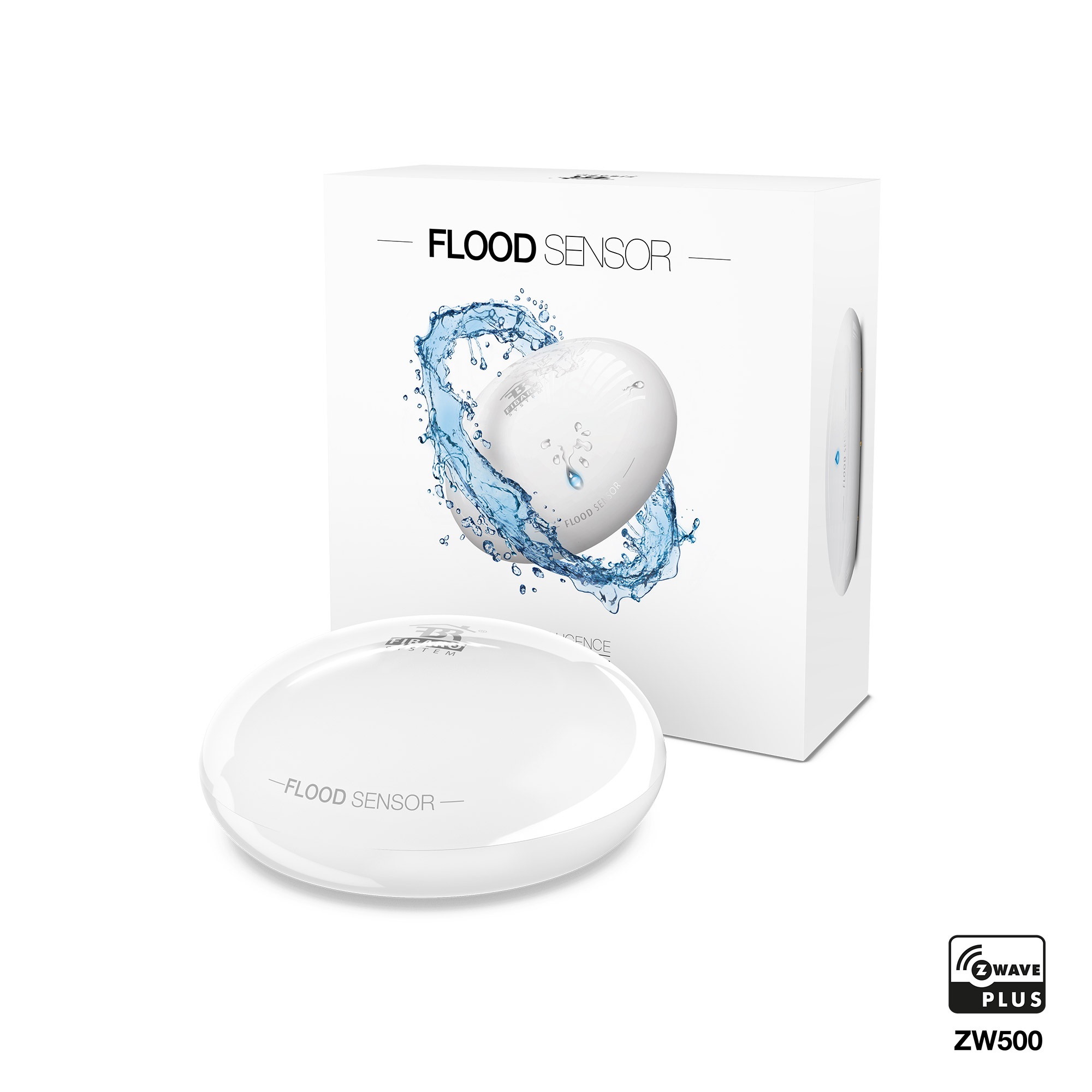
FIBARO Flood Sensor is a universal, Z-Wave Plus compatible, flood and temperature sensor. The device can be powered using battery, 12/24V DC power supply or both. Flood alarm is sent to the Z-Wave network devices or additionally to any alarm system controller through opening a NC contact using the external power supply. The device has a built-in temperature sensor that allows to monitor ambient temperature. FIBARO Flood Sensor is designed to be placed on the floor or mounted on a wall (in this case Flood Sensor probes should be extended using addition wire). The device has a built-in visual LED indicator and an acoustic alarm. The LED indicator signals flood, operating mode or the Z-Wave network communication range. In addition, the device is equipped with a sensor reporting tilt or movement to the main controller e.g. when someone has taken the Sensor from its original location. FIBARO Flood Sensor is sink-proof, which means it drifts on the water surface and keeps on sending alarm signal in case of substantial inundation of water (if not wired). Flood Sensor is compatible with any Z-Wave or Z-Wave Plus Controller.
Want to buy adds it to your wish list and follows FIBARO for updates. I own it adds it to your collection.
FIBARO Flood Sensor is a universal, Z-Wave Plus compatible, flood and temperature sensor. The device can be powered using battery, 12/24V DC power supply or both. Flood alarm is sent to the Z-Wave network devices or additionally to any alarm system controller through opening a NC contact using the external power supply. The device has a built-in temperature sensor that allows to monitor ambient temperature. FIBARO Flood Sensor is designed to be placed on the floor or mounted on a wall (in this case Flood Sensor probes should be extended using addition wire). The device has a built-in visual LED indicator and an acoustic alarm. The LED indicator signals flood, operating mode or the Z-Wave network communication range. In addition, the device is equipped with a sensor reporting tilt or movement to the main controller e.g. when someone has taken the Sensor from its original location. FIBARO Flood Sensor is sink-proof, which means it drifts on the water surface and keeps on sending alarm signal in case of substantial inundation of water (if not wired). Flood Sensor is compatible with any Z-Wave or Z-Wave Plus Controller.
Hardware platform
ZM5202
Short description
FIBARO Flood Sensor is a universal, battery or VDC powered, Z-Wave Plus compatible, flood and temperature sensor, designed to be placed on a floor or on a wall.
Product identifier
FGFS-101
Countries / regions
India
Certification number
ZC10-19076584
Radio range z wave (m)
40
Configuration parameters
Parameter Number Name Description Format Size Min Value Max Value Default Value Parameter Values 2
Supports explorer frames
Yes
Supported command classes
Identifier Name Key Version COMMAND_CLASS_SENSOR_ALARM
Controlled command classes
Identifier Name Key Version COMMAND_CLASS_BASIC
Supported multilevel sensors
Multilevel Sensor Type Air temperature
Supported notification types
Notification Type Event / State Water Alarm
Value cr123 a color value white firmware updatable value updatable by consumer by rf sensors value air temperature supported notification types value water alarm battery quantity value 1 association groups
Group Number Maximum Nodes Supported End Point ID Description 1
From to description 0 0 acoustic and visual alarms inactive 1 1 acoustic alarm inactive, visual alarm active 2 2 acoustic alarm active, visual alarm inactive 3 3 acoustic and visual alarms active 7 requested dimming level / roller blind opening level when sending turn on / open command to 2nd association group devices determines the requested “on” level to be sent to devices from 2nd association group upon flood event. 0 2 0 0 255 from to description 1 99 requested level 255 255 turn a device on 1 alarm cancellation delay determines time period (in seconds) by which a flood sensor will retain the flood state after the flooding itself has ceased. the sensor will keep on reporting flooding to the main controller. this parameter setting does not affect acoustic and visual alarms, which turn off immediately after flooding ceases. 0 2 0 0 0 from to description 0 3600 in seconds, each 1s 9 deactivate turning off devices in 2nd association group & alarm cancellation in 3rd group this setting decides whether device turn off commands and alarm cancellation notifications will be sent to devices in 2nd and 3rd association groups (respectively) setting the parameter’s value to 0 disables sending these two commands to associated devices. this means that these devices will not be informed when the flooding has ceased. it is still possible to cancel alarms in 3rd association group by choosing second (green) menu position (see “menu & visual indications” on page 10). 0 1 0 0 1 from to description 0 0 alarm (flooding) cancellation inactive 1 1 alarm (flooding) cancellation active 10 temperature measurement interval time interval (in seconds) between consecutive measurements of battery level and temperature (done by built in temperature sensor). if the temperature differs from previously reported by a value determined in parameter 12, it will be reported to the z wave controller. in battery mode more significant battery level changes will be reported. short time intervals mean more frequent communication, which results in shortened battery life. after consecutive failed and successful communication attempts, the sensor will go to standby mode. 0 4 0 0 300 from to description 1 65535 in seconds 50 low temperature alarm threshold the parameter stores a temperature value, below which visual indicator blinks with a colour determined by a parameter 61 settings. by default the visual indicator blinks blue. 0 2 0 0 1500 from to description 10000 10000 each 0.01°c 51 high temperature alarm threshold the parameter stores a temperature value, above which visual indicator blinks with a colour determined by the parameter 62 settings. by default the visual indicator blinks red. 0 2 0 0 3500 from to description 10000 10000 each 0.01°c 61 low temperature alarm indicator colour parameter stores rgb colour value (see the note below for details). 0 4 0 0 255 from to description 0 16777215 red 16711680; green 65280; blue 255; yellow 16776960; turquoise 65535; orange 16750848; white 16777215; indicator turned off 0 62 high temperature alarm indicator colour parameter stores rgb colour value (see the note below for details). note the main controller interprets colours as a sum of its component colours value. each colours value is a number from 0 to 255. indicated colour = 65536 red + 256 green + blue colour decimal value red 16711680 green 65280 blue 255 yellow 16776960 turquoise 65535 orange 16750848 white 16777215 indicator turned off 0 0 4 0 0 16711680 from to description 0 16777215 red 16711680; green 65280; blue 255; yellow 16776960; turquoise 65535; orange 16750848; white 16777215; indicator turned off 0 63 temperature indication using led visual indicator parameter determines visual indicator’s operation. setting to 0 turns the temperature led indication off, saving battery life. 0 1 0 0 2 from to description 0 0 visual indicator does not indicate the temperature 1 1 visual indicator indicates the temperature (blink) every temperature measurement interval (parameter 10, constant current and battery) and wake up interval (battery mode) 2 2 visual indicator indicates the temperature continuously, only in constant power mode 73 temperature measurement compensation parameter stores a temperature value to be added to or deducted from the current temperature measured by internal temperature sensor in order to compensate the difference between air temperature and temperature at the floor level. 0 2 0 0 0 from to description 10000 10000 °c 74 alarm frame sent to 1st and 4th association group activation (movement tamper / button tamper) the device is able to report tamper alarms resulting from sensor’s tilt/movement or tmp button state change (e.g. taking off the top cover). 0 1 0 0 2 from to description 0 0 tamper alarms inactive 1 1 button tamper alarm active 2 2 movement tamper alarm active 3 3 button and movement tampers alarm active 75 alarms signalization duration the device is capable of automatically turning off alarm signalization after a certain amount of time. long lasting alarm may reduce batter life, when constantly signalized. the parameter determines time after which alarm will become “quiet” still active but the device will go into battery saving mode. visual or acoustic alarm will be reactivated after time specified in the parameter 76. when alarm status ceases, alarm will be turned off immediately. note parameter 75 is ignored when parameter 2 is set to 0. 0 4 0 0 0 from to description 0 0 alarms active indefinitely 1 65535 time in seconds 76 alarm signalization reactivation period parameter determines a time period after which an alarm will be turned back on (in case it was turned off by parameter 75 setting). it will also resend commands to 2nd and 3rd association groups as if the alarm was detected again. note in case a time period set in parameter 76 is shorter than the one specified in parameter 75, the device will not quiet the alarm, it will remain active. 0 4 0 0 0 from to description 0 0 alarm reactivation inactive 1 65535 time in seconds 77 flood sensor functionality turned off allows to turn off the internal flood sensor. tamper and built in temperature sensor will remain active. 0 1 0 0 0 from to description 0 0 default flood sensor operation (flood detection, reactions) 1 1 built in flood sensor turned off (does not change its state in the main controller, does not send alarm notifications nor turn on/off commands to 2nd/3rd association groups with flood state changes. always visible in the main controller as turned off) 78 associations in z wave network security mode this parameter defines how commands are sent in specified association groups: as secure or non secure. parameter is active only in z wave network security mode. it does not apply to 1st “lifeline “group. 0 1 0 0 7 from to description 0 0 acoustic and visual alarms inactive 0 0 none of the groups sent as secure 1 1 2nd group, control, sent as secure 1 1 acoustic alarm inactive, visual alarm active 2 2 acoustic alarm active, visual alarm inactive 2 2 3rd group, alarm, sent as secure 3 3 acoustic and visual alarms active 4 4 4th group, tamper, sent as secure texts