✅ Future-proofBuilt to keep working — even if the maker walks away.
It works locally over Z-Wave, so it keeps running even if FIBARO shuts down the app or the servers. Nothing here ties you to a single company's survival.
Works locally over Z-Wave — keeps running without the maker's cloud
Still in production
Based on how this device connects (local vs. cloud), whether it’s still sold and supported, and its app / subscription. A guide, not a guarantee.
Connectivity
Z-Wave
Prices
No prices yet — be the first to add one.
Community tags
Be the first to tag this page — tags appear right away. Try a theme, capability, or subject (e.g. WWII, heist, slow burn, time travel, A24).
Community photos
Photos from members
No member photos yet.
Reviews
What members say
Sign in to rate Gesture Controller and share a photo.
No reviews yet.
Community
Be the first to start a thread about Gesture Controller
Threads post into the FIBARO community forum.
Sign in to start a thread in the FIBARO community.
Edit history
Loading edit history…
Certified
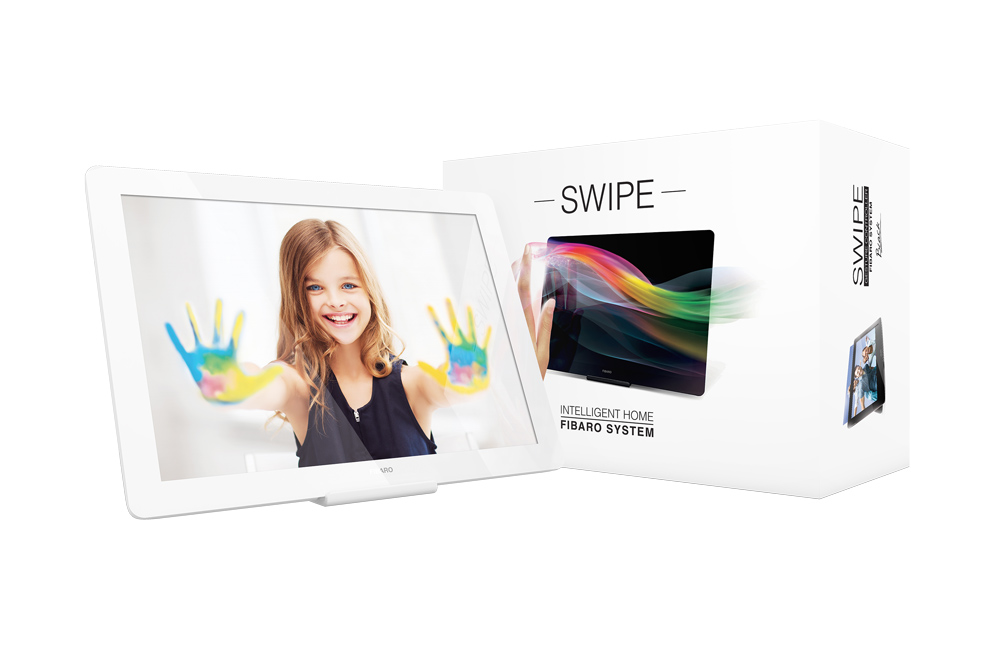
FIBARO Swipe is a revolutionary, battery-powered gesture control pad that allows you to control devices through the Z-Wave network. Swipe your hand up, down, left or right in front of the pad, make circular gestures and use sequences of gestures to get full and intuitive control of your smart home. Installed device perfectly matches your interior design, as it resembles a picture frame. You can even personalize it with your favourite picture. Gesture controlled menu allow to add/remove or reset the device without dismounting it. The device is equipped with a buzzer that confirms performed gestures and other actions.
Want to buy adds it to your wish list and follows FIBARO for updates. I own it adds it to your collection.
FIBARO Swipe is a revolutionary, battery-powered gesture control pad that allows you to control devices through the Z-Wave network. Swipe your hand up, down, left or right in front of the pad, make circular gestures and use sequences of gestures to get full and intuitive control of your smart home. Installed device perfectly matches your interior design, as it resembles a picture frame. You can even personalize it with your favourite picture. Gesture controlled menu allow to add/remove or reset the device without dismounting it. The device is equipped with a buzzer that confirms performed gestures and other actions.
Hardware platform
ZM5101
Short description
FIBARO Swipe is a battery-powered, wireless, Z-Wave gesture controller.
Product identifier
FGGC-001
Countries / regions
Japan
Certification number
ZC10-19076665
Configuration parameters
Parameter Number Name Description Format Size Min Value Max Value Default Value Parameter Values 1
Supports explorer frames
Yes
Supported command classes
Identifier Name Key Version COMMAND_CLASS_POWERLEVEL
Controlled command classes
Identifier Name Key Version COMMAND_CLASS_BASIC
Value 4 battery type value 1,5 v aa color value white association groups
Group Number Maximum Nodes Supported End Point ID Description 1
From to description 0 0 default orientation 1 1 180 degree rotation 2 2 90 degree clockwise rotation 3 3 90 degree counter clockwise rotation 2 buzzer acoustic signal settings buzzer acoustic signal settings. note active acoustic signals can be selected in parameter 4. 0 1 0 0 1 from to description 0 0 gestures detection is not signalled 1 1 gestures detection is signalled 3 led diode visual indicator settings visual indication of gestures detection. 0 1 0 0 0 from to description 0 0 gestures detection is not indicated 1 1 gestures detection is indicated 4 buzzer signalling result of gesture recognition acoustic signalling of gesture recognition result (using the built in buzzer). note parameter 4 is relevant only if parameter 2 is set to 1. 0 1 0 0 3 from to description 1 1 only successful recognition is signalled 2 2 only failed recognition is signalled 3 3 successful and failed recognition is signalled 5 powering mode interval of updating the current mode this parameter determines how often the device checks if the usb power supply is connected and updates powering mode if needed. 0 2 0 0 4 from to description 0 0 powering mode is not updated 1 1080 (in minutes) time interval 6 power saving mode (battery mode) this parameter determines operation of gesture detection when battery powered. when standby mode is selected, hold gesture must be performed to exit power saving mode and reactivate normal gesture recognition. the device in standby mode consumes the least battery life. when simple mode mode is selected, gesture recognition is always active, but only slowly performed gestures will be recognized properly (high battery consumption). 0 1 0 0 0 from to description 0 0 standby mode 1 1 simple mode 2 2 the swipe does not enter power saving mode 7 hold gesture to enter the menu this parameter allows to choose if the menu can be entered using the hold gesture. caution after disabling the hold gesture in parameter 7, menu can be entered by using the b button only! 0 1 0 0 0 from to description 0 0 hold gesture to enter the menu enabled 1 1 hold gesture to enter the menu disabled 23 switch off control frame value for flick down gesture this parameter allows to set value sent in switch off command frame to the association group. 0 2 0 0 0 from to description 0 99 control frame value for flick down gesture 255 255 control frame value for flick down gesture 24 switch on control frame value for flick left gesture this parameter allows to set value sent in switch on command frame to the association group. 0 2 0 0 255 from to description 0 99 control frame value for flick left gesture 255 255 control frame value for flick left gesture 25 switch off control frame value for flick left gesture this parameter allows to set value sent in switch off command frame to the association group. 0 2 0 0 0 from to description 0 99 control frame value for flick left gesture 255 255 control frame value for flick left gesture 31 1st gestures sequence (slot 1) value containing sequence of gestures. see "sequences of gestures" on page 12 for more information. note parameters 31 36 can also be used to manually set a sequence according to details described in "sequences of gestures" on page 12. 0 2 0 0 0 from to description 0 1076 value containing sequence of gestures. texts