✅ Future-proofBuilt to keep working — even if the maker walks away.
It works locally over Z-Wave, so it keeps running even if Aeotec shuts down the app or the servers. Nothing here ties you to a single company's survival.
Works locally over Z-Wave — keeps running without the maker's cloud
Still in production
Companion app is actively updated
Based on how this device connects (local vs. cloud), whether it’s still sold and supported, and its app / subscription. A guide, not a guarantee.
Connectivity
Z-Wave
Prices
No prices yet — be the first to add one.
Community tags
Be the first to tag this page — tags appear right away. Try a theme, capability, or subject (e.g. WWII, heist, slow burn, time travel, A24).
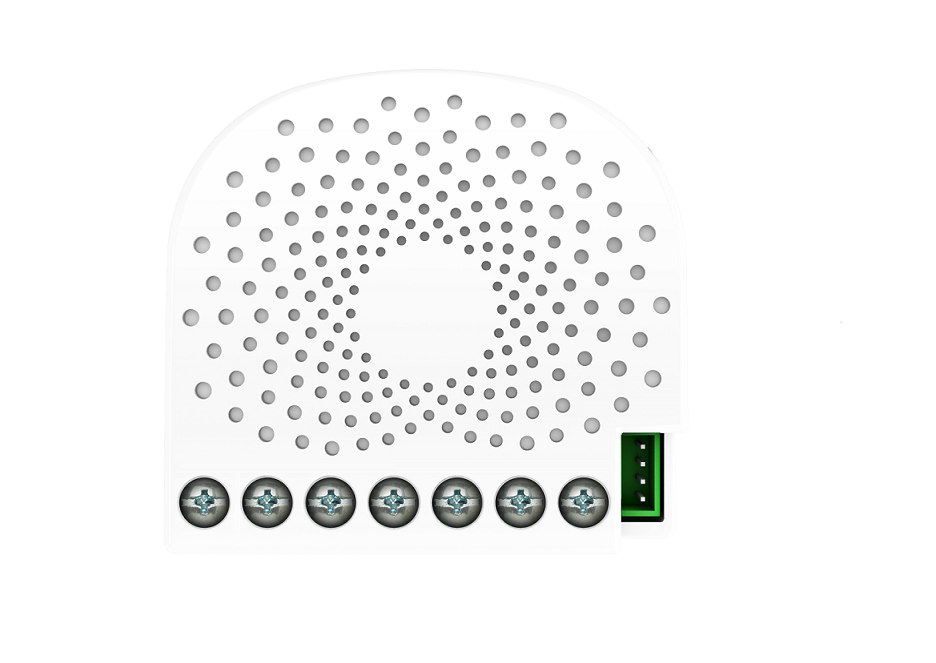
Aeotec Nano Shutter is a Z-Wave motor controller specifically used to enable Z-Wave command and control (up/down/stop) for existing window covering motors. It can connect to 2 external manual switches/buttons to control the motor up/down/stop independently. Its surface has a pin socket, which can be used for connecting to the touch panel, so you can also use the touch panel to control the Nano Shutter. The wireless module is powered from the mains supply. In the event of power failure, non-volatile memory retains all programmed information relating to the units operating status. Nano Shutter is also a security Z-Wave plus device and supports Over The Air (OTA) feature for the products firmware upgrade. It can be a repeater in the Z-Wave network. Acting as a bridge for communication, it will forward Z-Wave command messages to their destinations if the originating controller is out of range from the destination node. By taking advantage of the Z-Wave mesh network, commands can be routed to their destination via intermediary “listening” Z-Wave products. Products that are Z-Wave certified can be used and communicate with other Z-Wave certified devices.
Want to buy adds it to your wish list and follows Aeotec for updates. I own it adds it to your collection.
Aeotec New Generation Nano Shutter 1. Used to control the motor of Curtain, support Shutter Mode and Venetian Mode . 2. Can be calibrated according to diff e rent curtains 3. Used to control other Z-Wave device directly. 4. Support S2, more safe and more re liable 5. Support SmartStart, faster inclusion
Hardware platform
ZM5101
Short description
Aeotec New Generation motor controller
Product identifier
ZW141-C
Countries / regions
European Union
Supports smart start
Yes
Certification number
ZC10-19116785
Radio range z wave (m)
40
Configuration parameters
Parameter Number Name Description Format Size Min Value Max Value Default Value Parameter Values 41
Supports explorer frames
Yes
Supported command classes
Identifier Name Key Version COMMAND_CLASS_FIRMWARE_UPDATE_MD_V4
Value white firmware updatable value updatable by consumer by rf neutral wire required switch load capacity current value 2.5 a window covering control features value manual calibration supports horizontal blinds/louvers supports up/down motion association groups
Group Number Maximum Nodes Supported End Point ID Group Name Profile Description 1
From to description 1 1 in repositioning 0 0 repositioning complete 42 calibration lock used to enable/disable calibration lock from different ways. 1 1 0 2 1 from to description 2 2 enable action button/ command/s1/s2 calibration 1 1 enable action button/ command calibration 0 0 disable calibration 80 switch status report selection choose which report to send when switch status change 1 1 0 2 2 from to description 2 2 switch multilevel report 1 1 basic report 0 0 no report 85 extern button mode setting extern button mode setting 1 1 0 1 0 from to description 0 0 extern button 1 maps to z wave button,extern button 2 opens or stops motor. 1 1 extern button 1 maps to z wave button,extern button 2 closes or stops motor. 120 switch type of external switch 1 used to set switch type of external switch 1,and reports will return automatically during identify. 1 1 0 4 0 from to description 0 0 unidentified mode when no identify is set, and indicate identify fails when in identify. 1 1 2 state switch mode 2 2 3 way switch mode 3 3 push button mode 4 4 enter automatic identification mode(the blue led will fast blink) 121 switch type of external switch 1 used to set switch type of external switch 1,and reports will return automatically during identify. 1 1 0 4 0 from to description 0 0 unidentified mode when no identify is set, and indicate identify fails when in identify. 1 1 2 state switch mode 2 2 3 way switch mode 3 3 push button mode 4 4 enter automatic identification mode(the blue led will fast blink) 248 function setting of external switch s1&s2 used to enable/disable function of external switch s1&s2. note : this value can be combine, e.g. set to 3(1+2=3),means networking function and reset function are both enable. 1 1 1 2 1 from to description 1 1 enable network function, inclusion/exclusion 2 2 enable reset to factory default function 255 reset function used to reset configuration parameter value to default value or reset to factory default settings. note: parameter 0x16, 0x22, 0x23, 0x24, 0x25, 0x27, 0x28 will not reset to default value by this command. 1 4 0 1431655765 0 from to description 0 0 reset all configuration parameters to default settings 1431655765 1431655765 reset to factory default settings and removed from the z wave network texts