✅ Future-proofBuilt to keep working — even if the maker walks away.
It works locally over Z-Wave, so it keeps running even if B.One shuts down the app or the servers. One thing to note: companion app hasn't been updated in over 2 years.
Works locally over Z-Wave — keeps running without the maker's cloud
Still in production
Companion app hasn't been updated in over 2 years
Based on how this device connects (local vs. cloud), whether it’s still sold and supported, and its app / subscription. A guide, not a guarantee.
Connectivity
Z-Wave
Prices
No prices yet — be the first to add one.
Community tags
Be the first to tag this page — tags appear right away. Try a theme, capability, or subject (e.g. WWII, heist, slow burn, time travel, A24).
Community photos
Photos from members
No member photos yet.
Reviews
What members say
Sign in to rate B.One Smart Dimmer and share a photo.
No reviews yet.
Community
Be the first to start a thread about B.One Smart Dimmer
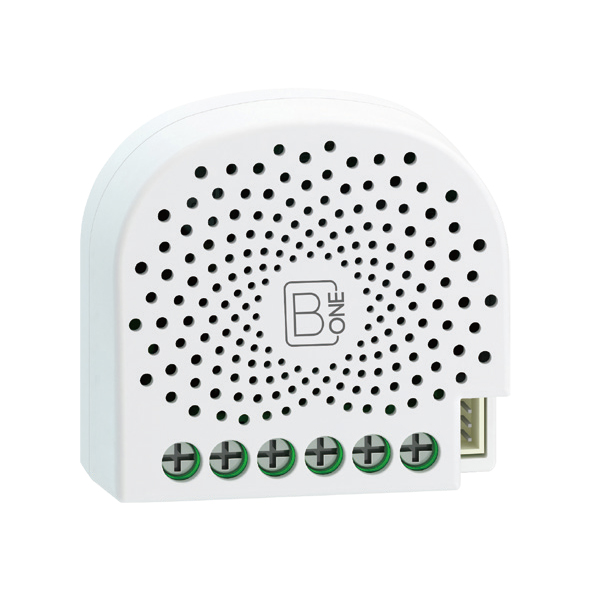
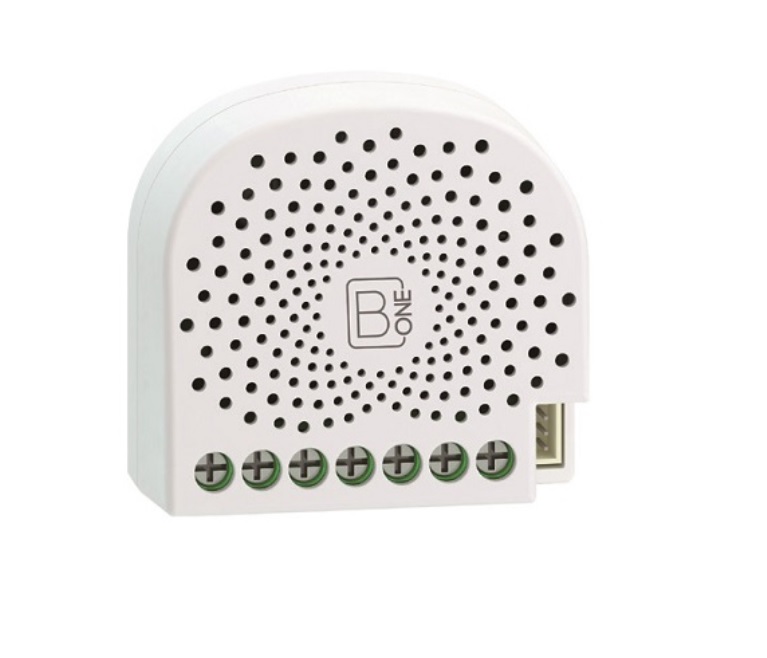
B.One Smart Dimmer is a Z-Wave multilevel switch device based on Z-Wave enhanced 232 slave library. You can use it to control (on/off/dim) of any kinds of bulbs. It supports a variety of installations of wiring connection, such as the 2-wire, 3-wire connection and so on. It can be included and operated in any Z-Wave network with other Z-Wave certified devices from other manufacturers and/or other applications. All non-battery operated nodes within the network will act as repeaters regardless of vendor to increase reliability of the network. The B.One Smart Dimmer is a security Z-Wave plus device, so a security enabled controller is needed for take full advantage of all functionally for the Dimmer. It also supports the Over The Air (OTA) feature for the product’s firmware upgrade. As soon as B.One Smart Dimmer is removed from a Z-Wave network, it will be restored into default factory setting.
Want to buy adds it to your wish list and follows B.One for updates. I own it adds it to your collection.
B.One Smart Dimmer is a Z-Wave multilevel switch device based on Z-Wave enhanced 232 slave library. You can use it to control (on/off/dim) of any kinds of bulbs. It supports a variety of installations of wiring connection, such as the 2-wire, 3-wire connection and so on. It can be included and operated in any Z-Wave network with other Z-Wave certified devices from other manufacturers and/or other applications. All non-battery operated nodes within the network will act as repeaters regardless of vendor to increase reliability of the network. The B.One Smart Dimmer is a security Z-Wave plus device, so a security enabled controller is needed for take full advantage of all functionally for the Dimmer. It also supports the Over The Air (OTA) feature for the product’s firmware upgrade. As soon as B.One Smart Dimmer is removed from a Z-Wave network, it will be restored into default factory setting.
Hardware platform
ZM5101
Short description
Z-Wave Smart Dimmer.
Product identifier
B1SD01-ZW-IN
Countries / regions
India
Certification number
ZC10-19116800
Radio range z wave (m)
40
Configuration parameters
Parameter Number Name Description Format Size Min Value Max Value Default Value Parameter Values 3
Supports explorer frames
Yes
Supported command classes
Identifier Name Key Version COMMAND_CLASS_SCENE_ACTUATOR_CONF
Controlled command classes
Identifier Name Key Version COMMAND_CLASS_BASIC
Supported notification types
Notification Type Event / State Heat Alarm
Supported / controlled meter types
Meter Type Rate Type Description Electric meter
Value electric energy firmware updatable value updatable by consumer by rf electric load type value incandescent dimmable led dimmable fluorescent supported notification types value heat alarm power management switch type value push button z wave scene type value scene color value white association groups
Group Number Maximum Nodes Supported End Point ID Group Name Profile Description 4
From to description 0 0 disable 1 1 enable 4 overheat protection. output load will be turned off automatically after 30 seconds and if the temperature of product inside exceeds 100 ℃. 0 1 0 0 0 from to description 0 0 disable 1 1 enable 80 to set which notification would be sent to the associated devices (group 1) to set which notification would be sent to the associated devices (group 1) when the state of nano dimmer’s load is changed. 0 1 0 0 0 from to description 0 0 send nothing 1 1 send hail cc 2 2 send basic cc report 3 3 send multilevel switch report 4 4 send hail cc when using the manual switch to change the load state. 81 to set which notification would be sent to the associated nodes in association group 3 to set which notification would be sent to the associated nodes in association group 3 when using the external switch 1 to switch the loads. 0 1 0 0 1 from to description 0 0 send nothing 1 1 send basic set cc 82 to set which notification would be sent to the associated nodes in association group 4 to set which notification would be sent to the associated nodes in association group 4 when using the external switch 2 to switch the loads. 0 1 0 0 1 from to description 0 0 send nothing 1 1 send basic set cc 85 set appointment 1 set the on time of output load. 0 4 0 0 1573017 from to description 0 99 the brightness level 256 316 the minute value of on time 65536 65560 the hour value of on time 16777215 16777222 the day value (mon to sun) 86 set appointment 2 set the on time of output load. 0 4 0 0 2293760 from to description 0 99 the brightness level 256 316 the minute value of on time 65536 65560 the hour value of on time 16777215 16777222 the day value (mon to sun) 90 enables/disables parameter 91 and 92 below: enables/disables the function of parameter 91 and 92. 0 1 0 0 0 from to description 0 0 disable 1 1 enable 91 set the threshold value of wattage. threshold change in wattage (in terms of wattage) to induce an automatic report. 0 2 0 0 25 from to description 0 60000 the thershold value range is 0 to 60000 92 set the threshold value of wattage. threshold change in wattage (in terms of percentage) to induce an automatic report. 0 1 0 0 5 from to description 0 100 the thershold value range is 0 to 100 100 set parameter 101 103 to default value. set parameter 101 103 to default value. 0 1 0 0 0 from to description 0 0 reset the parameter 101 103 101 to set which reports need to be sent in report group 1. to set which reports need to be sent in report group 1. 0 4 0 0 0 from to description 1 1 send meter report of voltage (v) 2 2 send meter report of current (a) 4 4 send meter report of wattage (w) 8 8 send meter report of energy (k wh) 102 to set which reports need to be sent in report group 2. to set which reports need to be sent in report group 2. 0 1 0 0 0 from to description 1 1 send meter report of voltage (v) 2 2 send meter report of current (a) 4 4 send meter report of wattage (w) 8 8 send meter report of energy (k wh) 103 to set which reports need to be sent in report group 3. to set which reports need to be sent in report group 3. 0 1 0 0 0 from to description 1 1 send meter report of voltage (v) 2 2 send meter report of current (a) 4 4 send meter report of wattage (w) 8 8 send meter report of energy (k wh) 110 set parameter 111 113 to default value. set parameter 111 113 to default value. 0 1 0 0 0 from to description 0 0 reset the parameter 111 113 111 set the interval of automatic report for report group 1. set the interval of automatic report for report group 1. 0 4 0 0 3 from to description 1 2147483647 the range of interval time is 1 to 2147483647. 112 set the interval of automatic report for report group 2. set the interval of automatic report for report group 2. 0 4 0 0 600 from to description 1 2147483647 the range of interval time is 1 to 2147483647. 113 set the interval of automatic report for report group 2. set the interval of automatic report for report group 3. 0 4 0 0 600 from to description 1 2147483647 the range of interval time is 1 to 2147483647. 120 configure the external switch mode for s1. configure the external switch mode for s1. 0 1 0 0 0 from to description 0 0 enter automatic identification mode 1 1 momentary push button mode 2 2 3 way switch mode 3 3 2 state switch mode 121 configure the external switch mode for s2. configure the external switch mode for s2. 0 1 0 0 0 from to description 0 0 enter automatic identification mode 1 1 momentary push button mode 2 2 3 way switch mode 3 3 2 state switch mode 122 get the state of touch panel port get the state of touch panel port 0 1 0 0 0 from to description 0 0 the touch panel is not connected. 5 5 the touch panel is connected. 123 set the control destination for external switch s1 set the control destination for external switch s1 0 1 0 0 3 from to description 1 1 control the output loads of itself. 2 2 control the other nodes 3 3 control the output loads of itself and other nodes. 124 set the control destination for external switch s2 set the control destination for external switch s2. 0 1 0 0 3 from to description 1 1 control the output loads of itself. 2 2 control the other nodes. 3 3 control the output loads of itself and other nodes 125 set the default dimming rate. set the default dimming rate. 0 1 0 0 3 from to description 1 255 the value range is 1 to 255 seconds. 128 get the current working mode get the current working mode. note: this parameter is a get only parameter. 0 1 0 0 0 from to description 0 0 unknown working mode. 1 1 2 wire mode 2 2 3 wire mode 129 set the dimming principle set the dimming principle. 0 1 0 0 1 from to description 0 0 trailing edge mode 1 1 leading edge mode 130 to get what type of load the dimmer is connected to. to get what type of load the dimmer is connected to. note: this parameter is a get only parameter. 0 1 0 0 0 from to description 0 0 unknown load. 1 1 resistive load 2 2 capacitive load 3 3 inductive load 131 set the min brightness level that the load can reach to. set the min brightness level that the load can reach to. 0 1 0 0 0 from to description 0 99 the level range is 0 to 99. 132 set the max brightness level that the load can reach to. note: set the max brightness level that the load can reach to. note: 0 1 0 0 99 from to description 0 99 the level range is 0 to 99. 249 set the recognition way of load set the recognition way of load 0 1 0 0 2 from to description 0 0 never recognize the load when power on 1 1 only recognize once when first power on 2 2 recognize the load once power on 252 lock/unlock configuration parameters lock/unlock configuration parameters. 0 1 0 0 0 from to description 0 0 unlock 1 1 lock 255 reset the smart dimmer reset the smart dimmer to factory default. 0 4 0 0 0 from to description 0 0 reset all configuration parameters to factory default setting 1431655765 1431655765 reset to factory default setting and removed from the z wave network texts