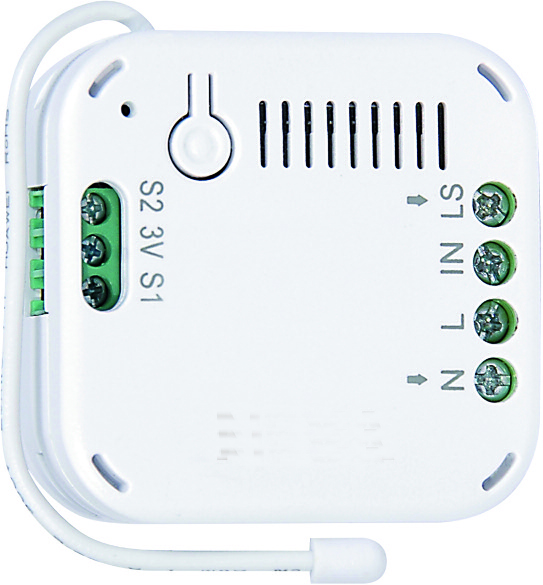
✅ Future-proofBuilt to keep working — even if the maker walks away.
It works locally over Z-Wave, so it keeps running even if COMAP shuts down the app or the servers. Nothing here ties you to a single company's survival.
Works locally over Z-Wave — keeps running without the maker's cloud
Still in production
Companion app is actively updated
Based on how this device connects (local vs. cloud), whether it’s still sold and supported, and its app / subscription. A guide, not a guarantee.
Connectivity
Z-Wave
Prices
No prices yet — be the first to add one.
Community tags
Be the first to tag this page — tags appear right away. Try a theme, capability, or subject (e.g. WWII, heist, slow burn, time travel, A24).
Community photos
Photos from members
No member photos yet.
Reviews
What members say
Sign in to rate In-Wall On/Off Switch Module and share a photo.
No reviews yet.
Community
Be the first to start a thread about In-Wall On/Off Switch Module
The In-Wall On/Off Module is a Z-Wave enabled device which is fully compatible with any Z-Wave enabled network. Z-Wave enabled devices displaying the Z-Wave logo can also be used with it regardless of the manufacturer, and ours can also be used in other manufacturer’s Z-Wave enabled networks. Inclusion of this unit on other manufacturer’s Wireless Controller menu allows remote operation of the unit and the connected load. Z-Wave node in the system also acts as a repeater, so the RF signal can reach its intended receiver by routing around obstacles and radio dead spots. The In-Wall On/Off Module is designed to control the on/off status of lighting and appliances load in your house. Two sets of dry contacts provide more wiring applications. For security, the unit can detect overheating and will turn off relay automatically to avoid damage. At 230V voltage, this module can support up to 2500W resistive, 1200W incandescent, 700W motor, or 320W (40W*8) fluorescent load.
Want to buy adds it to your wish list and follows COMAP for updates. I own it adds it to your collection.
The In-Wall On/Off Module is a Z-Wave enabled device which is fully compatible with any Z-Wave enabled network. Z-Wave enabled devices displaying the Z-Wave logo can also be used with it regardless of the manufacturer, and ours can also be used in other manufacturer’s Z-Wave enabled networks. Inclusion of this unit on other manufacturer’s Wireless Controller menu allows remote operation of the unit and the connected load. Z-Wave node in the system also acts as a repeater, so the RF signal can reach its intended receiver by routing around obstacles and radio dead spots. The In-Wall On/Off Module is designed to control the on/off status of lighting and appliances load in your house. Two sets of dry contacts provide more wiring applications. For security, the unit can detect overheating and will turn off relay automatically to avoid damage. At 230V voltage, this module can support up to 2500W resistive, 1200W incandescent, 700W motor, or 320W (40W*8) fluorescent load.
Hardware platform
SD3502
Short description
The LIZY0005 is an in-wall on/off switch module.
Product identifier
LIZY0005
Countries / regions
European Union
Certification number
ZC10-17025432
Radio range z wave (m)
40
Configuration parameters
Parameter Number Name Description Format Size Min Value Max Value Default Value Parameter Values 1
Supports explorer frames
Yes
Supported command classes
Identifier Name Key Version COMMAND_CLASS_POWERLEVEL
Controlled command classes
Identifier Name Key Version COMMAND_CLASS_BASIC
Supported notification types
Notification Type Event / State System
Value 2500 w loads controlled value 2 supported notification types value system switch type value push button color value white communications protocol value z wave serial api electric load type value incandescent led firmware updatable value not updatable association groups
Group Number Maximum Nodes Supported End Point ID Description 1
From to description 0 99 dimmer value 255 255 switch on 2 the delaying time to report to group 1: delay for while second to send 0 1 0 0 3 from to description 3 25 unit is second 3 remember the last status to setup remember the on/off last status if power applied 1: remember 0: do not remember 0 1 0 0 1 from to description 0 1 remember or not 4 switch 1 switching type setup the switch contact switch mode 0: single pole double throw 1: toggle switch 0 1 0 0 0 from to description 0 1 mode 1 or mode 2 texts