✅ Future-proofBuilt to keep working — even if the maker walks away.
It works locally over Z-Wave, so it keeps running even if FIBARO shuts down the app or the servers. Nothing here ties you to a single company's survival.
Works locally over Z-Wave — keeps running without the maker's cloud
Still in production
Based on how this device connects (local vs. cloud), whether it’s still sold and supported, and its app / subscription. A guide, not a guarantee.
Connectivity
Z-Wave
Prices
No prices yet — be the first to add one.
Community tags
Be the first to tag this page — tags appear right away. Try a theme, capability, or subject (e.g. WWII, heist, slow burn, time travel, A24).
Sign in to start a thread in the FIBARO community.
Edit history
Loading edit history…
Z-WaveCertified
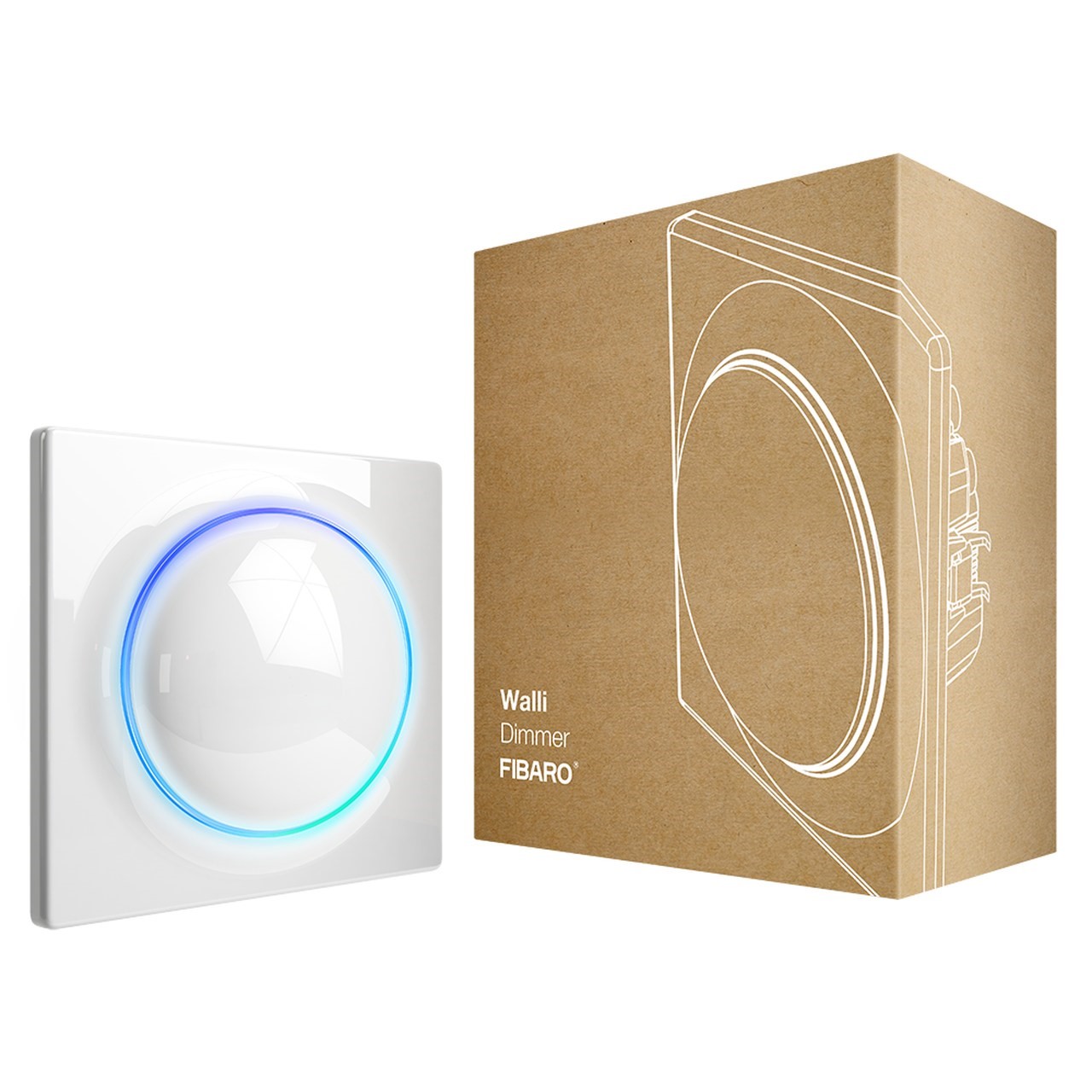
FIBARO Walli Dimmer is a smart wall dimmer designed to control light source via Z-Wave network. It measures active power and energy consumed by the controlled load. You can install it with provided cover plate or other compatible. Main features of FIBARO Walli Dimmer: - Can be used for dimming: o 110/230V operated conventional incandescent and halogen, o 12V operated ELV halogen lamps and dimmable LED bulbs (with electronic transformers), o 12V operated MLV halogen lamps (with ferromagnetic transformers), o dimmable LED bulbs, o dimmable compact fluorescent CFL tube lamps, o supported dimmable light sources (power factor > 0.5) with minimal power of 5VA using FIBARO Bypass 2. - Can be used for switching: o compact fluorescent CFL tube lamps with electronic ballast, o fluorescent tube lamps with electronic ballast, o LED bulbs (power factor > 0.7), o supported light sources (power factor > 0.5) with minimal power of 5VA using FIBARO Bypass 2. - Uses different operating modes: o „Trailing edge” for resistive loads (R) o „Trailing edge” for resistive-capacitive loads (RC) o „Leading edge” for resistive-inductive loads (RL) - Can be used with provided cover plate or one of the following: o GIRA – System 55 (Standard 55, E2, Event, Event Clear), o Legrand – Céliane, o Schneider – Odace. - Active power and energy consumption metering. - Can be installed in two and three-wired configuration. - Calibrates automatically to the connected light source. - Supports Z-Wave network Security Modes: S0 with AES-128 encryption and S2 Authenticated with PRNG-based encryption. - Works as Z-Wave signal repeater (all non-battery operated devices within the network will act as repeaters to increase reliability of the network). - May be used with all devices certified with the Z-Wave Plus certificate and should be compatible with such devices produced by other manufacturers.
Want to buy adds it to your wish list and follows FIBARO for updates. I own it adds it to your collection.
FIBARO Walli Dimmer is a smart wall dimmer designed to control light source via Z-Wave network. It measures active power and energy consumed by the controlled load. You can install it with provided cover plate or other compatible. Main features of FIBARO Walli Dimmer: - Can be used for dimming: o 110/230V operated conventional incandescent and halogen, o 12V operated ELV halogen lamps and dimmable LED bulbs (with electronic transformers), o 12V operated MLV halogen lamps (with ferromagnetic transformers), o dimmable LED bulbs, o dimmable compact fluorescent CFL tube lamps, o supported dimmable light sources (power factor > 0.5) with minimal power of 5VA using FIBARO Bypass 2. - Can be used for switching: o compact fluorescent CFL tube lamps with electronic ballast, o fluorescent tube lamps with electronic ballast, o LED bulbs (power factor > 0.7), o supported light sources (power factor > 0.5) with minimal power of 5VA using FIBARO Bypass 2. - Uses different operating modes: o „Trailing edge” for resistive loads (R) o „Trailing edge” for resistive-capacitive loads (RC) o „Leading edge” for resistive-inductive loads (RL) - Can be used with provided cover plate or one of the following: o GIRA – System 55 (Standard 55, E2, Event, Event Clear), o Legrand – Céliane, o Schneider – Odace. - Active power and energy consumption metering. - Can be installed in two and three-wired configuration. - Calibrates automatically to the connected light source. - Supports Z-Wave network Security Modes: S0 with AES-128 encryption and S2 Authenticated with PRNG-based encryption. - Works as Z-Wave signal repeater (all non-battery operated devices within the network will act as repeaters to increase reliability of the network). - May be used with all devices certified with the Z-Wave Plus certificate and should be compatible with such devices produced by other manufacturers.
Hardware platform
ZM5101
Short description
FIBARO Walli Dimmer is a smart wall dimmer designed to control light source via Z-Wave network.
Product identifier
FGWDEU-111
Countries / regions
European Union
Supports smart start
Yes
Certification number
ZC10-19046426
Radio range z wave (m)
40
Configuration parameters
Parameter Number Name Description Format Size Min Value Max Value Default Value Parameter Values 2
Supports explorer frames
Yes
Supported command classes
Identifier Name Key Version COMMAND_CLASS_FIRMWARE_UPDATE_MD_V4
Controlled command classes
Identifier Name Key Version COMMAND_CLASS_BASIC
Supported notification types
Notification Type Event / State Power Management
Supported / controlled meter types
Meter Type Rate Type Description Electric meter
Value white electric load type value incandescent fluorescent led loads controlled value 4 supported meter type value electric energy supported notification types value power management system switch load capacity current value 13 a per one channel; 16 a total switch type value push button association groups
Group Number Maximum Nodes Supported End Point ID Description 1
From to description 0 0 function disabled 10 5000 (1.0 500.0 w, step 0.1 w) – power threshold 31 alarm configuration 2nd slot this parameter determines to which alarm frames and how the device should react. the parameters consist of 4 bytes, three most significant bytes are set according to the official z wave protocol specification. 0 4 0 0 0 from to description 1 1 [msb] – notification type 2 2 notification value 3 3 event/state parameters 4 4 [lsb] – action 65 energy reports – on change this parameter defines minimal change (from the last reported) in measured energy that results in sending new report. 0 2 0 0 10 from to description 0 0 reporting on change disabled 1 500 (0.01 5k wh, 0.01k wh step) – minimal change 10 led frame – power limit this parameter determines maximum active power. exceeding it results in the led frame flashing violet. function is active only when parameter 11 is set to 8 or 9. 0 4 0 0 3500 from to description 100 5000 (10.0 500.0 w, step 0.1 w) – power threshold 11 led frame – colour when on this parameter defines the led colour when thedevice is on. when set to 8 or 9, led frame colour will change depending on he measured power and parameter 10. other colours are set permanently and do not depend on power consumption. 0 1 0 0 1 from to description 0 0 led disabled 1 1 white 2 2 red 3 3 green 4 4 blue 5 5 yellow 6 6 cyan 7 7 magenta 9 9 colour changes in steps depending on measured power 8 8 colour changes smoothly depending on measured power 60 power reports – include self consumption this parameter determines whether the power measurements should include power consumed by the device itself. 0 1 0 0 0 from to description 0 0 self consumption not included 1 1 self consumption included 24 buttons orientation this parameter allows reversing the operation of the buttons. 0 1 0 0 0 from to description 0 0 default (1st button brightens, 2nd button dims) 1 1 reversed (1st button dims, 2nd button brightens) 154 automatic control – dimming step size this parameter defines the percentage value of dimming step during the automatic control. 0 1 0 0 1 from to description 1 99 (1 99%, 1% step) – dimming step 164 second button – switch off value sent to 2nd and 3rd association groups this parameter defines value sent with switch on command to devices associated in 2nd and 3rd association group. 0 2 0 0 0 from to description 0 99 value sent 254 254 send value equal to the current level 255 255 value sent 165 double click – set level this parameter defines brightness level set after double clicking any of the buttons. the same value is also sent to devices associated with 2nd and 3rd association group. 0 1 0 0 99 from to description 0 99 (0 99%, 1% step) – set level 159 force auto calibration changing value of this parameter will force the calibration process. during the calibration parameter is set to 1 or 2 and switched to 0 upon completion. 0 1 0 0 0 from to description 1 1 force auto calibration without fibaro bypass 2 0 0 readout 2 2 force auto calibration with fibaro bypass 2 160 auto calibration status (read only parameter) this parameter determines operating mode of the device (automatic/manual settings). 0 1 0 0 0 from to description 0 0 calibration procedure not performed or the device operates on manual settings 1 1 the device operates on auto calibration settings 1 remember device state this parameter determines how the device will react in the event of power supply failure (e.g. power outage). 0 1 0 0 1 from to description 1 1 restores remembered state after restoring power 0 0 remains switched off after restoring power 152 incandescence level of dimmable compact fluorescent lamps the virtual value set as a percentage level between parameters min (1%) and max. (99%). the device will set to this value after the first switch on. it is required for warming up and switching dimmable compact fluorescent lamps and certain types of light sources. 0 1 0 0 1 from to description 1 99 (1 98%, 1% step) – level of brightness 155 automatic control – time of dimming step this parameter defines the time of performing a single dimming step set in parameter 154 during the automatic control. 0 2 0 0 1 from to description 0 255 this parameter defines the time of performing a single dimming step set in parameter 154 during the automatic control. 156 manual control – dimming step size this parameter defines the percentage value of the dimming step during the manual control. 0 1 0 0 1 from to description 1 99 (1 99%, 1% step) – dimming step 157 manual control – time of dimming step this parameter defines the time of performing a single dimming step set in parameter 156 during the manual control. 0 2 0 0 5 from to description 0 255 (0 2.55s, 10ms step) 158 auto off functionality this parameter allows to automatically switch off the device after a specified time from switching the light source on. it may be useful when the device is installed in the stairway. 0 2 0 0 0 from to description 1 32767 (1s 9.1h, 1s step) – auto off time 0 0 auto off disabled 161 burnt out bulb detection this parameter defines percentage power variation (compared to power consumption measured during the calibration) to be interpreted as load error/burnt out bulb. 0 1 0 0 0 from to description 0 0 function disabled 1 99 (1 99%, 1% step) – power variation 162 time delay of a burnt out bulb and overload detection this parameter defines detection delay for the burnt out bulb (parameter 161) and overload (parameter 2). 0 2 0 0 5 from to description 0 0 detection of a burnt out bulb disabled 1 255 (1 255s, 1s step) – time delay 163 first button – switch on value sent to 2nd and 3rd association groups this parameter defines value sent with switch off command to devices associated in 2nd and 3rd association group. 0 2 0 0 255 from to description 0 99 value sent 254 254 send value equal to the current level 255 255 value sent 164 second button – switch off value sent to 2nd and 3rd association groups this parameter defines value sent with switch off command to devices associated in 2nd and 3rd association group. 0 2 0 0 0 from to description 0 99 value sent 254 254 send value equal to the current level 150 minimum brightness level this parameter is set automatically during the calibration process, but can be changed manually after the calibration. 0 1 0 0 1 from to description 1 98 (1 98%, 1% step) – level of brightness 151 maximum brightness level this parameter is set automatically during the calibration process, but can be changed manually after the calibration. 0 1 0 0 99 from to description 2 99 (2 99%, 1% step) – level of brightness 153 incandescence time of dimmable compact fluorescent lamps this parameter determines the time required for switching compact fluorescent lamps and certain types of light sources. setting this parameter to 0 will disable the incandescence functionality. 0 2 0 0 0 from to description 0 255 (0 25.5s, 0.1s step) – incandescence time 172 on/off mode this mode is necessary while connecting non dimmable light sources. setting this parameter to 1 automatically ignores brightening/dimming time settings. forced auto calibration will set this parameter’s value to 2. 0 1 0 0 2 from to description 0 0 on/off mode disabled (dimming is possible) 1 1 on/off mode enabled (dimming is not possible) 2 2 mode selected automatically 170 load control mode this parameter allows to set the desired load control mode. auto calibration sets value of this parameter to 2 (control mode recognized during auto calibration), but the installer may force control mode using this parameter. after changing parameter value, turn the load off and on to change control mode. 0 1 0 0 2 from to description 0 0 forced leading edge 1 1 forced trailing edge 2 2 control mode selected automatically (based on auto calibration) 171 load control mode recognized during auto calibration (read only) this parameter allows to read load control mode that was set during auto calibration. 0 1 0 0 0 from to description 1 1 trailing edge 0 0 leading edge 173 dimmability of the load (read only) this parameter allows to read if the load detected during calibration procedure is dimmable. 0 1 0 0 0 from to description 0 0 load recognized as dimmable 1 1 load recognized as non dimmable 174 soft start functionality this parameter allows to set time required to warm up the filament of halogen bulb. 0 1 0 0 1 from to description 0 0 no soft start 1 1 short soft start (0.1s) 2 2 long soft start (0.5s) 175 auto calibration after power on this parameter determines the trigger of auto calibration procedure, e.g. power on, load error, etc. 0 1 0 0 1 from to description 0 0 no auto calibration after power on 2 2 auto calibration after each power on 3 3 auto calibration after each load error (no load, load failure, burnt out bulb), if parameter 176 is set to 1 also after surge (output overvoltage) and overcurrent (output overcurrent) 4 4 auto calibration after each power on or after each load error (no load, load failure, burnt out bulb), if parameter 176 is set to 1 also after surge (output overvoltage) and overcurrent (output overcurrent) 41 second button – scenes sent this parameter determines which actions result in sending scene ids assigned to them. values can be combined (e.g. 1+2=3 means that scenes for single and double click are sent). enabling scenes for triple click disables entering the device in learn mode by triple clicking. 0 1 0 0 0 from to description 1 1 key pressed 1 time 8 8 key hold down and key released 2 2 key pressed 2 time 4 4 key pressed 3 time 176 behaviour after overcurrent or surge error occurrences related to surge or overcurrent results in turning off the output to prevent possible malfunction. by default the device performs three attempts to turn on the load (useful in case of temporary, short failures of the power supply). 0 1 0 0 1 from to description 0 0 device permanently disabled until re enabling by command or external switch 1 1 three attempts to turn on the load 177 brightness level correction for flickering loads correction reduces spontaneous flickering of some capacitive loads (e.g. dimmable leds) at certain brightness levels in 2 wire installation. in countries using ripple control, correction may cause changes in brightness. in this case it is necessary to disable correction or adjust the time of correction for flickering loads. 0 2 0 0 255 from to description 0 0 automatic correction disabled 1 254 (1 254s, 1s step) – duration of correction 255 255 automatic correction always enabled 178 method of calculating the active power this parameter defines how to calculate active power. it is useful in a case of 2 wire connection with light sources other than resistive. 0 1 0 0 0 from to description 0 0 measurement based on the standard algorithm 1 1 approximation based on the calibration data 2 2 approximation based on the control angle 179 approximated power at the maximum brightness level this parameter determines the approximate value of the power that will be reported by the device at its maximum brightness level. 0 2 0 0 0 from to description 0 500 (0 500 w, 1 w step) – power consumed by the load at the maximum brightness level. texts