✅ Future-proofBuilt to keep working — even if the maker walks away.
It works locally over Z-Wave, so it keeps running even if FIBARO shuts down the app or the servers. Nothing here ties you to a single company's survival.
Works locally over Z-Wave — keeps running without the maker's cloud
Still in production
Based on how this device connects (local vs. cloud), whether it’s still sold and supported, and its app / subscription. A guide, not a guarantee.
Connectivity
Z-Wave
Prices
No prices yet — be the first to add one.
Community tags
Be the first to tag this page — tags appear right away. Try a theme, capability, or subject (e.g. WWII, heist, slow burn, time travel, A24).
Sign in to start a thread in the FIBARO community.
Edit history
Loading edit history…
Certified
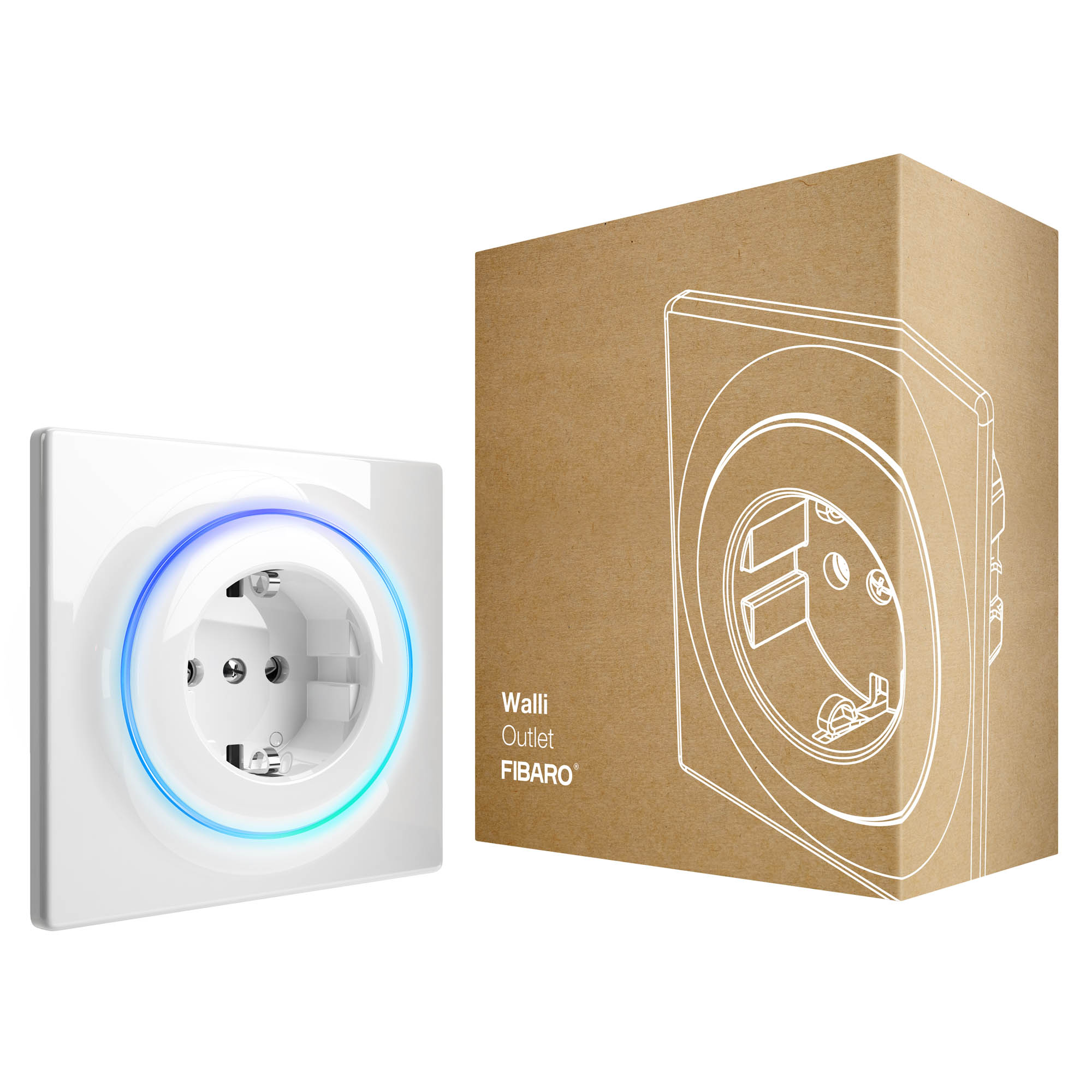
FIBARO Walli Outlet is a smart electrical outlet designed to control electrical devices via Z-Wave network. It measures active power and energy consumed by the controlled load. You can install it with provided cover plate or other compatible. Main features of FIBARO Walli Outlet: - Can turn ON/OFF plugged device remotely. - Available in two versions for plug types: o Type E, o Type F. - Can be used with provided cover plate or one of the following: o GIRA – System 55 (Standard 55, E2, Event, Event Clear), o Legrand – Céliane, o Schneider – Odace. - Active power and energy consumption metering. - Displays current load using multicolour LED frame (with FIBARO cover plate). - Supports Z-Wave network Security Modes: S0 with AES-128 encryption and S2 Authenticated with PRNG-based encryption. - Works as Z-Wave signal repeater (all non-battery operated devices within the network will act as repeaters to increase reliability of the network). - May be used with all devices certified with the Z-Wave Plus certificate and should be compatible with such devices produced by other manufacturers.
Want to buy adds it to your wish list and follows FIBARO for updates. I own it adds it to your collection.
FIBARO Walli Outlet is a smart electrical outlet designed to control electrical devices via Z-Wave network. It measures active power and energy consumed by the controlled load. You can install it with provided cover plate or other compatible. Main features of FIBARO Walli Outlet: - Can turn ON/OFF plugged device remotely. - Available in two versions for plug types: o Type E, o Type F. - Can be used with provided cover plate or one of the following: o GIRA – System 55 (Standard 55, E2, Event, Event Clear), o Legrand – Céliane, o Schneider – Odace. - Active power and energy consumption metering. - Displays current load using multicolour LED frame (with FIBARO cover plate). - Supports Z-Wave network Security Modes: S0 with AES-128 encryption and S2 Authenticated with PRNG-based encryption. - Works as Z-Wave signal repeater (all non-battery operated devices within the network will act as repeaters to increase reliability of the network). - May be used with all devices certified with the Z-Wave Plus certificate and should be compatible with such devices produced by other manufacturers.
Hardware platform
ZM5101
Short description
FIBARO Walli Outlet is a smart electrical outlet designed to control electrical devices via Z-Wave network.
Product identifier
FGWOx-011
Countries / regions
European Union
Supports smart start
Yes
Certification number
ZC10-19056516
Radio range z wave (m)
40
Configuration parameters
Parameter Number Name Description Format Size Min Value Max Value Default Value Parameter Values 1
Supports explorer frames
Yes
Supported command classes
Identifier Name Key Version COMMAND_CLASS_FIRMWARE_UPDATE_MD_V4
Controlled command classes
Identifier Name Key Version COMMAND_CLASS_BASIC
Supported notification types
Notification Type Event / State Power Management
Supported / controlled meter types
Meter Type Rate Type Description Electric meter
Value 6 supported meter type value electric energy supported notification types value power management system switch load capacity current value 16 a for resistive, incandescent and inductive loads, 4 a for pilot duty, motors and electronic ballasts color value white electric load type value incandescent inductive (e.g. motor) association groups
Group Number Maximum Nodes Supported End Point ID Description 1
From to description 0 0 remains switched off after restoring power 1 1 restores remembered state after restoring power 2 overload safety switch this function allows to turn off the controlled device in case o f exceeding the defined power. controlled device can be turned back on via button or sending a control frame. 0 4 0 0 0 from to description 0 0 function disabled 10 36800 (1.0 3680.0 w, step 0.1 w) – power threshold 10 led frame – power limit this parameter determines maximum active power. exceeding it results in the led frame flashing violet. function is active only when parameter 11 is set to 8 or 9. 0 4 0 0 36800 from to description 500 36800 (50.0 3680.0 w, step 0.1 w) – power threshold 11 led frame – colour when on this parameter defines the led colour when the device is on. when set to 8 or 9, led frame colour will change depending on he measured power and parameter 10. other colours are set permanently and do not depend on power consumption. 0 1 0 0 8 from to description 0 0 led disabled 1 1 white 2 2 red 3 3 green 4 4 blue 5 5 yellow 6 6 cyan 7 7 magenta 8 8 colour changes smoothly depending on measured power 9 9 colour changes in steps depending on measured power 31 alarm configuration 2nd slot this parameter determines to which alarm frames and how the device should react. the parameters consist of 4 bytes, three most significant bytes are set according to the official z wave protocol specification. 0 4 0 0 0 from to description 1 1 [msb] – notification type 2 2 notification value 3 3 event/state parameters 4 4 [lsb] – action 45 associations – 2nd group this parameter determines which actions will result in sending control frames to devices associated in 2nd group. 0 1 0 0 3 from to description 1 1 power exceeds up threshold 2 2 power drops below down threshold 3 3 power exceeds up threshold or drops below down threshold 46 associations – up threshold this parameter determines upper power threshold for 2nd association group (paramter 45). exceeding it will result in sending value set in parameter 47. cannot be lower than down threshold (parameter 48). 0 4 0 0 500 from to description 100 36800 (10 3680 w, 0.1 w step) – power threshold 47 associations – up threshold frame value this parameter defines value sent to devices in 2nd association group when power exceeds up threshold set in parameter 46 (using basic command class). 0 2 0 0 255 from to description 0 0 turn off 1 99 set level 255 255 turn on 48 associations – down threshold this parameter determines lower power threshold for 2nd association group (paramter 45). exceeding it will result in sending value set in parameter 49. 0 4 0 0 300 from to description 0 36700 (0 3670 w, 0.1 w step) – power threshold 49 associations – down threshold frame value this parameter defines value sent to devices in 2nd association group when power drops below down threshold set in parameter 48 (using basic command class). 0 2 0 0 0 from to description 0 0 turn off 1 99 set level 255 255 turn on 60 power reports – include self consumption this parameter determines whether the power measurements should include power consumed by the device itself. 0 1 0 0 0 from to description 0 0 self consumption not included 1 1 self consumption included 65 energy reports – on change this parameter defines minimal change (from the last reported) in measured energy that results in sending new report. 0 2 0 0 10 from to description 0 0 reporting on change disabled 1 500 (0.01 5k wh, 0.01k wh step) – minimal change texts