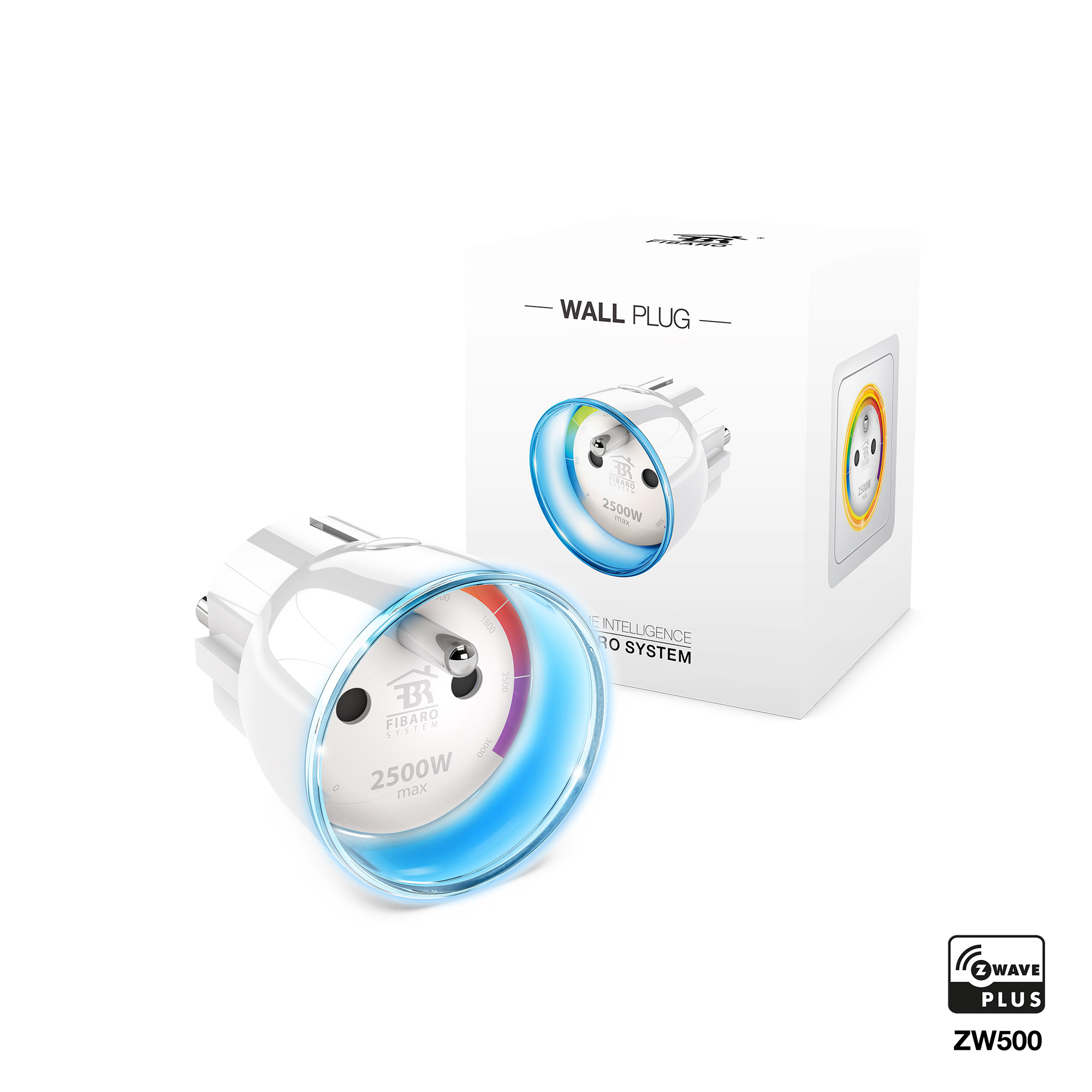
FIBARO Wall Plug is a remotely controlled plug-in switch with the ability to measure power and energy consumption. It uses a LED frame to visualize the current load and operating mode with color changing illumination. FIBARO Wall Plug makes it possible to control electrical devices in a convenient and maintenance-free way. Main features of FIBARO Wall Plug: - Compatible with any Z-Wave or Z-Wave Plus Controller. - Supports Z-Wave network Security Modes: S0 with AES-128 encryption and S2 with PRNG-based encryption. - Extremely easy installation - simply plug the device into the mains socket. - Works as a Z-Wave signal repeater. - Active power and energy consumption metering for plugged device. - Current value of the load and operating mode are indicated by the multi-color LED frame.
Long descriptionFIBARO Wall Plug is a remotely controlled plug-in switch with the ability to measure power and energy consumption. It uses a LED frame to visualize the current load and operating mode with color changing illumination. FIBARO Wall Plug makes it possible to control electrical devices in a convenient and maintenance-free way. Main features of FIBARO Wall Plug: - Compatible with any Z-Wave or Z-Wave Plus Controller. - Supports Z-Wave network Security Modes: S0 with AES-128 encryption and S2 with PRNG-based encryption. - Extremely easy installation - simply plug the device into the mains socket. - Works as a Z-Wave signal repeater. - Active power and energy consumption metering for plugged device. - Current value of the load and operating mode are indicated by the multi-color LED frame. Value power current supported meter type value electric energy supported notification types value power management switch load capacity current value 11 a for resistive load switch load capacity watts value 2500 w for resistive load association groupsGroup Number Maximum Nodes Supported End Point ID Description 1 From to description 0 0 device remains switched off 1 1 device restores the state from before the power failure 43 led ring illumination colour at the z wave network alarm detection this parameter defines the illumination colour in case of z wave alarm. 0 illumination turned off completely 1 no change in colour. led ring colour is determined by settings of parameters 41 or 42 2 led ring flashes red/blue/white 3 white, 4 red, 5 green, 6 blue, 7 yellow 8 cyan, 9 magenta 0 1 0 0 2 from to description 0 0 illumination turned off completely 1 1 no change in colour. led ring colour is determined by settings of parameters 41 or 42 2 2 led ring flashes red/blue/white 3 3 white 4 4 red 5 5 green 6 6 blue 7 7 yellow 8 8 cyan 9 9 magenta 23 the response after exceeding defined power values this parameter defines the way that 3rd association group devices are controlled. depends on the actual measured power (as parameters 21 and 22 settings). 0 1 0 0 6 from to description 2 2 turn the associated devices off, once the power drops below down value (parameter 21) 3 3 turn the associated devices on, once the power rises above up value (parameter 22) 4 4 turn the associated devices off, once the power rises above up value (parameter 22) 5 5 combination of 1 and 4. turn the associated devices on, once the power drops below down value (parameter 21). turn the associated devices off, once the power rises above up value (parameter 22). 1 1 turn the associated devices on, once the power drops below down value (parameter 21) 6 6 combination of 2 and 3. turn the associated devices off, once the power drops below down value (parameter 21). turn the associated devices on, once the power rises above up value (parameter 22). 24 switch on value „on/off” association groups the value of basic set command frame sent to the devices associated in „on/off” association groups (2, 3). „on/off (button)” association group in accordance with parameter 20. „on/off (power)” association group in accordance with parameter 23. note setting parameter 24 to appropriate value will result in: 0 turning off associated devices 1 99 forcing level of associated devices 255 setting associated devices to the last remembered state or turning them on 0 2 0 0 255 from to description 0 0 turning off associated devices 1 99 forcing level of associated devices 255 255 setting associated devices to the last remembered state or turning them on 41 led ring colour when controlled device is on when set to 1 or 2, led ring colour will change depending on active power and parameter 40. other colours are set permanently and do not depend on power consumption. 0 1 0 0 1 from to description 0 0 illumination turned off completely 1 1 colour changes continuously depending on active power 2 2 colour changes in steps depending on active power 3 3 white 4 4 red 6 6 blue 7 7 yellow 8 8 cyan 9 9 magenta 5 5 green 42 led ring illumination colour when controlled device is off this parameter defines the illumination colour after turning off. 0 illumination turned off completely 1 led ring is illuminated with a colour corresponding to the last measured power, before the controlled device was turned off 3 white, 4 red, 5 green, 6 blue, 7 yellow 8 cyan, 9 magenta 0 1 0 0 0 from to description 0 0 illumination turned off completely 1 1 led ring is illuminated with a colour corresponding to the last measured power, before the controlled device was turned off 3 3 white 4 4 red 5 5 green 6 6 blue 7 7 yellow 8 8 cyan 9 9 magenta 10 high priority power report this parameter determines the minimum percentage change in active power that will result in sending power report to the main controller with the highest priority in the z wave network. by default, the wall plug immediately sends the power report if the power load changes by 80%. note in extreme cases, reports may be sent every second if rapid and significant power load changes occur. frequent reporting may overload the z wave network so these parameter’s settings should reflect significant changes in power load only. 0 1 0 0 80 from to description 1 99 power change in percent 100 100 reports are disabled 31 response to alarm frames this parameter defines how the wall plug will respond to alarms (device’s status change). in case of values 1 or 2 the wall plug is operating normally and led ring signals an alarm through time defined in parameter 32 or until the alarm is cancelled. in case of values 5 to 50 the wall plug does not report status change, power changes, ignores basic set command frames. after time defined in parameter 32 or after the alarm cancellation, connected device is set to the previous state. note if “always on” function is active (parameter 1), settings of parameter 31 are ignored. 0 1 0 0 0 from to description 0 0 no reaction 1 1 turn connected device on 2 2 turn connected device off 5 50 (0.5 50.0s, step 0.1s) cyclically change device state with set period 1 always on function once activated, wall plug will keep the connected device constantly on, will stop reacting to alarm frames or pushing the b button. “always on” function turns the wall plug into a power and energy meter. connected device will not be turned off upon receiving an alarm frame from another z wave device (parameter 31 will be ignored). in “always on” mode, connected device may be turned off only after user defined power has been exceeded (parameter 3). in such a case, connected device can be turned on again by pushing the b button or sending a control frame. by default, overload protection is inactive. 0 1 0 0 0 from to description 1 1 function activated 0 0 function inactive 3 overload safety switch this function allows to turn off the controlled device in case of exceeding the defined power. controlled device will be turned off even if “always on” function is active (parameter 1). controlled device can be turned back on via b button or sending a control frame. by default this function is inactive. this functionality is not an overload safety protection nor a short circuit protection. circuit needs additional short circuit and overload protection. caution the device has a protection that will turn the load off in the case of detecting current greater than 110% of rated current. it is a safety function and it cannot be turned off. after its activation the load can be turned on back again by pressing the b button or sending a control frame. this function is independent of overload safety switch set in the parameter no. 3. 0 2 0 0 0 from to description 0 0 function inactive 10 30000 (1.0 3000.0 w, step 0.1 w) power threshold 50 associations in z wave network security mode this parameter defines how commands are sent in specified association groups: as secure or non secure. parameter is active only in z wave network security mode. this parameter does not apply to 1st „lifeline” group. 0 1 0 0 3 from to description 0 0 none of the groups sent as secure 1 1 2nd group sent as secure 2 2 3rd group sent as secure 3 3 2nd and 3rd group sent as secure textsID Description Value 1