✅ Future-proofBuilt to keep working — even if the maker walks away.
It works locally over Z-Wave, so it keeps running even if VEMMIO shuts down the app or the servers. Nothing here ties you to a single company's survival.
Works locally over Z-Wave — keeps running without the maker's cloud
Still in production
Based on how this device connects (local vs. cloud), whether it’s still sold and supported, and its app / subscription. A guide, not a guarantee.
Connectivity
Z-Wave
Prices
No prices yet — be the first to add one.
Community tags
Be the first to tag this page — tags appear right away. Try a theme, capability, or subject (e.g. WWII, heist, slow burn, time travel, A24).
Be the first to start a thread about double switch
Threads post into the VEMMIO community forum.
Sign in to start a thread in the VEMMIO community.
Edit history
Loading edit history…
Certified
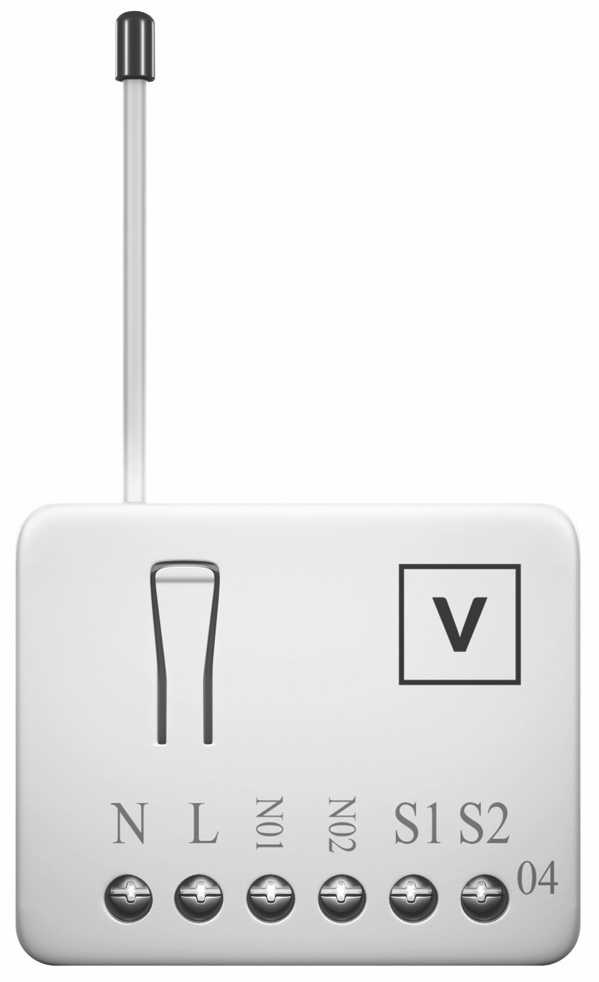
This in-wall dual relay switch module is a transceiver which is a Z-Wave Plus™ enabled device and is fully compatible with any Z-Wave™ enabled network. Z-Wave Plus™ enabled devices displaying the Z-Wave Plus™ logo can also be used with it regardless of the manufacturer, and can also be used in other manufacturer’s Z-Wave™ enabled networks. Mini size design let the module can easily hide itself into the wall box and that will be good for the house decoration. There are many kind of application by using the module to switch AC power On and Off, one main application is the light control. The new smart relay calibration technology can reduce the inrush current caused by the load and let the module work perfectly with many kind of light like incandescent, fluorescent and LED light. This in-wall switch module is able to detect Instant power wattage and overload current (7.5A) of connected light or appliances. When detecting overload state, the Module will be disabled and its On/Off button will be lockout of which LED will flash quickly. However, disconnect and re-connect the Module will reset its overload condition to normal status.
Want to buy adds it to your wish list and follows VEMMIO for updates. I own it adds it to your collection.
This in-wall dual relay switch module is a transceiver which is a Z-Wave Plus™ enabled device and is fully compatible with any Z-Wave™ enabled network. Z-Wave Plus™ enabled devices displaying the Z-Wave Plus™ logo can also be used with it regardless of the manufacturer, and can also be used in other manufacturer’s Z-Wave™ enabled networks. Mini size design let the module can easily hide itself into the wall box and that will be good for the house decoration. There are many kind of application by using the module to switch AC power On and Off, one main application is the light control. The new smart relay calibration technology can reduce the inrush current caused by the load and let the module work perfectly with many kind of light like incandescent, fluorescent and LED light. This in-wall switch module is able to detect Instant power wattage and overload current (7.5A) of connected light or appliances. When detecting overload state, the Module will be disabled and its On/Off button will be lockout of which LED will flash quickly. However, disconnect and re-connect the Module will reset its overload condition to normal status.
Hardware platform
SD3502
Short description
This in-wall dual relay switch module is a transceiver which is a Z- Wave Plus™ enabled device and is fully compatible with any Z-Wave™ enabled network.
Product identifier
DS-100
Countries / regions
European Union
Certification number
ZC10-17115849
Configuration parameters
Parameter Number Name Description Format Size Min Value Max Value Default Value Parameter Values 9
Supports explorer frames
Yes
Supported command classes
Identifier Name Key Version COMMAND_CLASS_SCENE_ACTUATOR_CONF
Supported / controlled meter types
Meter Type Rate Type Description Electric meter
Value white electric load type value incandescent firmware updatable value updatable by professional/technician switch load capacity current value 7.5 a supported meter type value electric energy association groups
Group Number Maximum Nodes Supported End Point ID Description 1
From to description 0 0 0 : switch off 1 1 1 : ignore 2 2 2 : switch toggle 3 3 3 : switch on 1 watt meter report period if the setting is configured for 1hour (set value =720), the ds 100 will report its instant power consumption every 1 hour to the node of correspond group. the maximum interval to report its instant power consumption is 45 hours (5s*32767/3600=45hr). 0 2 0 0 720 from to description 1 32767 720*5s=3600s=1hour 2 kwh meter report period if the setting is configured for 1hour (set value =6), the ds 100 will report its accumulated power consumption (kw/h) every 1 hour to the node of correspond group. the maximum interval to report its accumulated power consumption (kw/h) is 227.55 days (10min*32767/1440=227.55 days). 0 2 0 0 6 from to description 1 32767 6*10min= 1 hour 6 threshold of kwh for load caution this is a warning when the kwh of load over the preset threshold value, if the setting value is 10000, when the accumulated power consumption of relay1 or relay2 over this value, ds 100 will send kwh meter report command to the node of correspond group, minimum value is 1 kwh and default value is 10000 k wh. 0 2 0 0 10000 from to description 1 10000 10000 * 1 kwh=10000 kwh 7 restore switch state mode whenever the ac power return from lost, ds 100 will restore the switch state which could be switch off、last switch state、switch on. the default setting is last switch state. 0 1 0 0 1 from to description 0 0 0 : switch off 1 1 1 : last switch state 2 2 2 : switch on 10 existence of endpoint3 multi channel command is a good way to control relay1 and relay2 of ds 100 individually. the endpoint3 of ds 100 is related to both relay1 and relay2. in some condition it becomes redundant in multi channel command class. when the existence of endpoint3 is set as 2, the endpoint3 will be disabled. the default value is 1. endpoint1 and endpoint2 are fixed, only endpoint3 is dynamic. 0 1 0 0 1 from to description 2 2 2 : no endpoint3 1 1 1 : endpoint3 exist 3 selected relay if controller not using multi channel command class to access the relay of ds 100, you may configure the select value to react the basic command class、binary switch command class or meter command class v3 1. selected relay1: only relay1 can be controlled and report. 2. selected relay 2: only relay2 can be controlled and report. 3. selected relay1 and relay2: default select is 3 both relay1 and relay2 can be controlled and report. 0 1 0 0 3 from to description 1 1 1:relay1 2 2 2:relay2 3 3 3:relay1 & relay2 4 edge and pulse mode manual switch s1 and s2 can set to edge mode or pulse mode or edge toggle mode, default value is edge mode. 1. edge mode: this mode is suitable for the bi stable wall switch that has indicator point on the switch, and the same position correspond to same state of relay1 and relay2. if the ds 100 relay change the state because of receiving z wave rf command, it may need two times of change (switch on to off or switch off to on) to let relay back to the correspond state. 2. pulse mode: this mode is suitable for the toggle type wall switch to swap the state of relay1 or relay2. 0 1 0 0 1 from to description 3 3 3:edge toggle mode 2 2 2:pulse mode 1 1 1:edge mode 5 threshold of current for load caution this is a warning when the current of load over the preset threshold value, if the setting value is 750, when the load current of relay1 or relay2 over this value, ds 100 will send current meter report to the node of correspond group, the range of the setting value is from 10 to 750, and the default value is 750. 0 2 0 0 750 from to description 10 750 750*0.01 a = 7.5 a 8 auto off timer whenever ds 100 switches to on, the auto off timer begin to count down. after the timer decrease to zero, it will switch off automatically. however if auto off timer is set as 0, the auto off function will be disabled. the default setting is 0. 0 2 0 0 0 from to description 1 32767 1 0x7 fff : 1s ~ 32767s 0 0 0 : disable auto off function texts