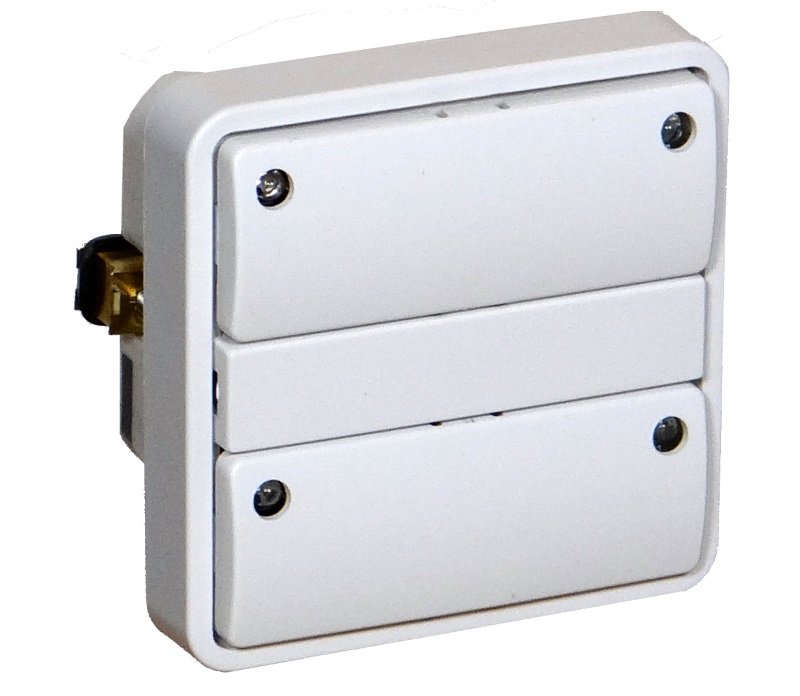
Long descriptionZHC5010 is a wall switch module with four buttons, four LEDs, a built-in relay switch and is designed to fit into standard Danish LK FUGA® wall boxes. From to description 0 0 separate mode (toggle mode). 1 1 in pair mode, left side sends on/up commands, right side sends off/down commands. 2 lower paddle buttons mode. configuration of pair mode for the lower two buttons (button #3 and #4). 0 1 0 0 0 from to description 1 1 in pair mode, left side sends on/up commands, right side sends off/down commands. 0 0 separate mode (toggle mode). 3 led #1 mode. configuration of the led status indication. 0 1 0 0 1 from to description 2 2 led indicates the status of the corresponding button, with inverted indication. 3 3 led indicates the status of corresponding paddle (in pair mode). 4 4 led indicates the status of the corresponding paddle (in pair mode), with inverted indication. 5 5 led indicates the status of the built in relay. 6 6 led indicates the status of the built in relay, with inverted indication. 7 7 led show a 5 seconds indication when the corresponding button is pressed. 0 0 led indication is disabled (led can be controlled by indicator command class set commands). 1 1 led indicates the status of the corresponding button. 4 led #2 mode. configuration of the led status indication. 0 1 0 0 1 from to description 4 4 led indicates the status of the corresponding paddle (in pair mode), with inverted indication. 5 5 led indicates the status of the built in relay. 6 6 led indicates the status of the built in relay, with inverted indication. 3 3 led indicates the status of corresponding paddle (in pair mode). 7 7 led show a 5 seconds indication when the corresponding button is pressed. 1 1 led indicates the status of the corresponding button. 2 2 led indicates the status of the corresponding button, with inverted indication. 0 0 led indication is disabled (led can be controlled by indicator command class set commands). 11 led #1 off brightness level. configure the percentage of light in the led, when the led is turned “off”. 0 1 0 0 0 from to description 0 100 specifies the brightness level of the led when it is off. 5 led #3 mode. configuration of the led status indication. 0 1 0 0 1 from to description 0 0 led indication is disabled (led can be controlled by indicator command class set commands). 1 1 led indicates the status of the corresponding button. 2 2 led indicates the status of the corresponding button, with inverted indication. 3 3 led indicates the status of corresponding paddle (in pair mode). 4 4 led indicates the status of the corresponding paddle (in pair mode), with inverted indication. 5 5 led indicates the status of the built in relay. 6 6 led indicates the status of the built in relay, with inverted indication. 7 7 led show a 5 seconds indication when the corresponding button is pressed. 6 led #4 mode. configuration of the led status indication. 0 1 0 0 1 from to description 0 0 led indication is disabled (led can be controlled by indicator command class set commands). 1 1 led indicates the status of the corresponding button. 6 6 led indicates the status of the built in relay, with inverted indication. 5 5 led indicates the status of the built in relay. 7 7 led show a 5 seconds indication when the corresponding button is pressed. 3 3 led indicates the status of corresponding paddle (in pair mode). 2 2 led indicates the status of the corresponding button, with inverted indication. 4 4 led indicates the status of the corresponding paddle (in pair mode), with inverted indication. 23 control of association groups for device 1 (button #1) enable or disable if received commands are relayed to the nodes in the association groups. 0 1 0 0 1 from to description 1 1 when commands are received by device 1, nodes in the association groups will be switched. 0 0 when commands are received by device 1, nodes in the association groups will not be switched, button activations will still send switch values. 24 control of association groups for device 2 (button #2) enable or disable if received commands are relayed to the nodes in the association groups. 0 1 0 0 1 from to description 0 0 when commands are received by device 2, nodes in the association groups will not be switched, button activations will still send switch values. 1 1 when commands are received by device 2, nodes in the association groups will be switched. 25 control of association groups for device 3 (button #3) enable or disable if received commands are relayed to the nodes in the association groups. 0 1 0 0 1 from to description 0 0 when commands are received by device 3, nodes in the association groups will not be switched, button activations will still send switch values. 1 1 when commands are received by device 3, nodes in the association groups will be switched. 7 led #1 brightness level. configure the percentage of light in the led, when the led is turned on. 0 1 0 0 50 from to description 0 100 specifies the brightness level of the led when it is on. 8 led #2 brightness level. configure the percentage of light in the led, when the led is turned on. 0 1 0 0 50 from to description 0 100 specifies the brightness level of the led when it is on. 9 led #3 brightness level. configure the percentage of light in the led, when the led is turned on. 0 1 0 0 50 from to description 0 100 specifies the brightness level of the led when it is on. 10 led #4 brightness level. configure the percentage of light in the led, when the led is turned on. 0 1 0 0 50 from to description 0 100 specifies the brightness level of the led when it is on. 17 scene notification offset. configure the scene sequence numbers that will be transmitted by central scene notifications. 0 1 0 0 1 from to description 1 127 button #1 will send scene [value], button #2 will send scene [value] + 1, button #3 will send scene [value] + 2, button #4 will send scene [value] + 3. 0 0 scene notifications are turned off. textsID Description Value 2