✅ Future-proofBuilt to keep working — even if the maker walks away.
It works locally over Z-Wave, so it keeps running even if Zooz shuts down the app or the servers. Nothing here ties you to a single company's survival.
Works locally over Z-Wave — keeps running without the maker's cloud
Still in production
Based on how this device connects (local vs. cloud), whether it’s still sold and supported, and its app / subscription. A guide, not a guarantee.
Connectivity
Z-Wave
Prices
No prices yet — be the first to add one.
Community tags
Be the first to tag this page — tags appear right away. Try a theme, capability, or subject (e.g. WWII, heist, slow burn, time travel, A24).
Community photos
Photos from members
No member photos yet.
Reviews
What members say
Sign in to rate Zooz Z-Wave Plus Power Switch and share a photo.
No reviews yet.
Community
Be the first to start a thread about Zooz Z-Wave Plus Power Switch
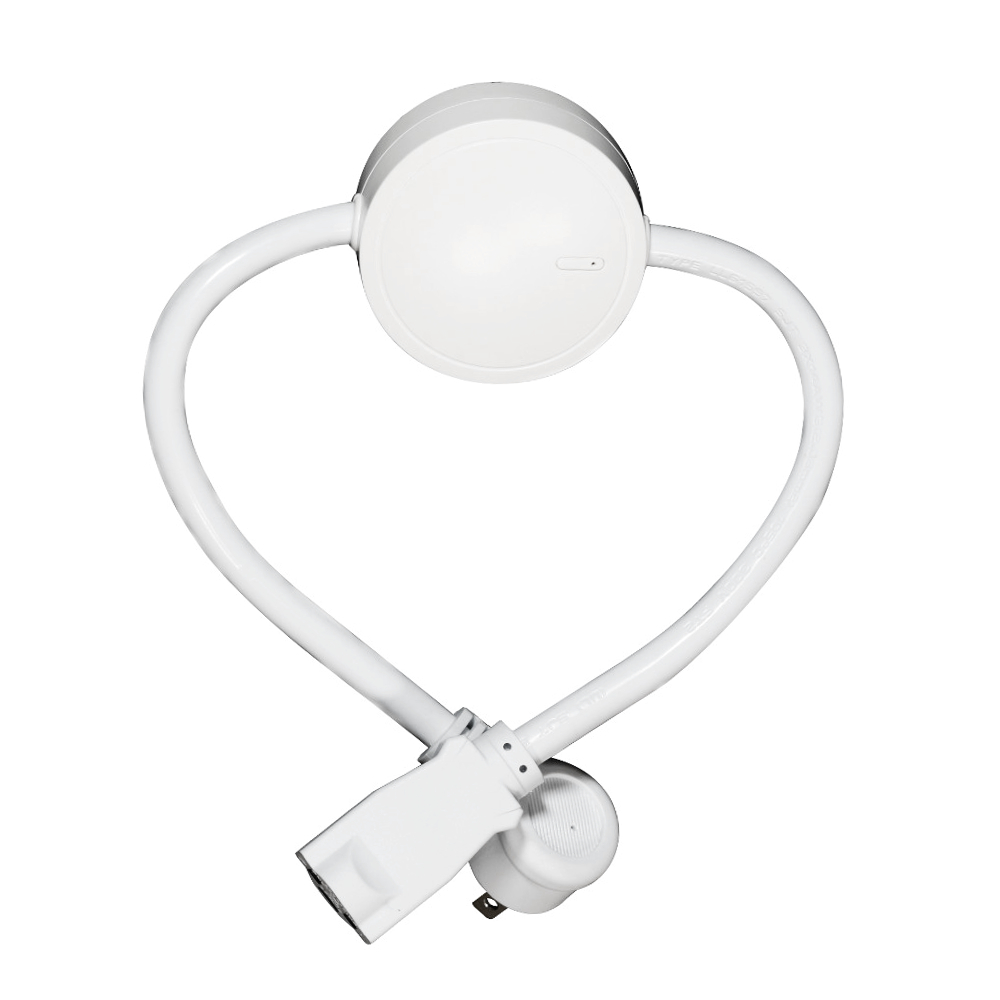
PRODUCT FEATURES: Local and Z-Wave wireless control of your favorite home appliances like microwaves and refrigerators. Energy monitoring in live mode or over time (your Z-Wave gateway needs to support this feature). Scene inclusion for custom automation events when included to a Z-Wave gateway controller. On/Off status recovery after power failure. LED indicator to display Z-Wave signal strength and power usage for the connected device. Added security with AES signal encryption (requires a security enabled gateway controller for full functionality). Z-Wave Plus with improved 500 chip for faster and more reliable wireless communication. Built-in range extender. SPECIFICATIONS: Model Number: ZEN15 Z-Wave Signal Frequency: 908.42 MHz Power: 120V, 60Hz Maximum Load: 15A, 1800W, ½ HP Operating Temperature: 14° – 104° F Range: Up to 130 feet line of sight Installation and Use: Indoor only Dimensions: 20” (with cord) x 2.6” x 1.1” Weight: 10oz
Want to buy adds it to your wish list and follows Zooz for updates. I own it adds it to your collection.
PRODUCT FEATURES: Local and Z-Wave wireless control of your favorite home appliances like microwaves and refrigerators. Energy monitoring in live mode or over time (your Z-Wave gateway needs to support this feature). Scene inclusion for custom automation events when included to a Z-Wave gateway controller. On/Off status recovery after power failure. LED indicator to display Z-Wave signal strength and power usage for the connected device. Added security with AES signal encryption (requires a security enabled gateway controller for full functionality). Z-Wave Plus with improved 500 chip for faster and more reliable wireless communication. Built-in range extender. SPECIFICATIONS: Model Number: ZEN15 Z-Wave Signal Frequency: 908.42 MHz Power: 120V, 60Hz Maximum Load: 15A, 1800W, ½ HP Operating Temperature: 14° – 104° F Range: Up to 130 feet line of sight Installation and Use: Indoor only Dimensions: 20” (with cord) x 2.6” x 1.1” Weight: 10oz
Hardware platform
ZM5101
Short description
The Zooz Power Switch is the perfect solution to control heavy duty appliances powered by 110V and rated at or below 15A / 1/2 HP.
Product identifier
ZEN15
Countries / regions
United States of America
Certification number
ZC10-17075708
Configuration parameters
Parameter Number Name Description Format Size Min Value Max Value Default Value Parameter Values 24
Supports explorer frames
Yes
Supported command classes
Identifier Name Key Version COMMAND_CLASS_SCENE_ACTUATOR_CONF
Supported / controlled meter types
Meter Type Rate Type Description Electric meter
Value white electric load type value incandescent fluorescent led inductive (e.g. motor) switch load capacity watts value 1800 supported meter type value electric energy association groups
Group Number Maximum Nodes Supported End Point ID Description 1
From to description 0 0 disabled 1 1 sends notification if status is changed manually or remotely via z wave 2 2 sends notification only if status is changed manually by pressing and releasing the z wave button on the power switch 151 power report value threshold choose how you want your power switch to report power consumption to your controller and associated devices. the number entered as value corresponds to the number of watts the appliance needs to go over for the change to be reported. so if 50 watts are entered by default, the power switch will report any change in power usage over 50 watts (whether it’s at least 50 watts more or 50 watts less compared to previous report). values: 0 – 65535; 0 – disabled (it will not report power consumption based on value change) 0 2 0 0 50 from to description 1 65535 number of watts the appliance needs to go over for the change to be reported 0 0 disabled 152 power report percentage threshold choose how you want your power switch to report power consumption to your controller and associated devices by percentage rate. the number entered as value corresponds to the percentage in power usage change the appliance needs to go over for the event to be reported. so if 10% is entered by default, the power switch will report any change in power consumption over 10% (whether it’s at least 10% more or 10% less power consumption compared to previous report). values: 0 – 255; 0 – disabled (it will not report power consumption based on percentage change) 0 2 0 0 10 from to description 1 255 percentage in power usage change the appliance needs to go over for the event to be reported 0 0 disabled 172 energy report frequency choose how often you want your power switch to report energy usage (kwh) to your controller and associated device. the number entered as value corresponds to the number of seconds. so if 300 is entered by default, the power switch will report energy usage every 300 seconds (5 minutes). values: 5 – 2678400; 0 – disabled (it will not report energy usage); 0 4 0 0 300 from to description 5 2678400 number of seconds 0 0 disabled 173 voltage report frequency choose how often you want your power switch to report voltage (v) to your controller and associated device. the number entered as value corresponds to the number of seconds. values: 5 – 2678400; 0 – disabled (default – it will not report voltage levels) 0 4 0 0 0 from to description 5 2678400 number of seconds 0 0 disabled 174 electricity report frequency choose how often you want your power switch to report levels of electrical current (a) to your controller and associated device. the number entered as value corresponds to the number of seconds. values: 5 – 2678400; 0 – disabled (default – it will not report electrical current levels) 0 4 0 0 0 from to description 5 2678400 number of seconds 0 0 disabled texts