✅ Future-proofBuilt to keep working — even if the maker walks away.
It works locally over Z-Wave, so it keeps running even if Philio shuts down the app or the servers. Nothing here ties you to a single company's survival.
Works locally over Z-Wave — keeps running without the maker's cloud
Still in production
Based on how this device connects (local vs. cloud), whether it’s still sold and supported, and its app / subscription. A guide, not a guarantee.
Connectivity
Z-Wave
Prices
No prices yet — be the first to add one.
Community tags
Be the first to tag this page — tags appear right away. Try a theme, capability, or subject (e.g. WWII, heist, slow burn, time travel, A24).
Community photos
Photos from members
No member photos yet.
Reviews
What members say
Sign in to rate Smart Energy Plug In Switch and share a photo.
No reviews yet.
Community
Be the first to start a thread about Smart Energy Plug In Switch
Threads post into the Philio community forum.
Sign in to start a thread in the Philio community.
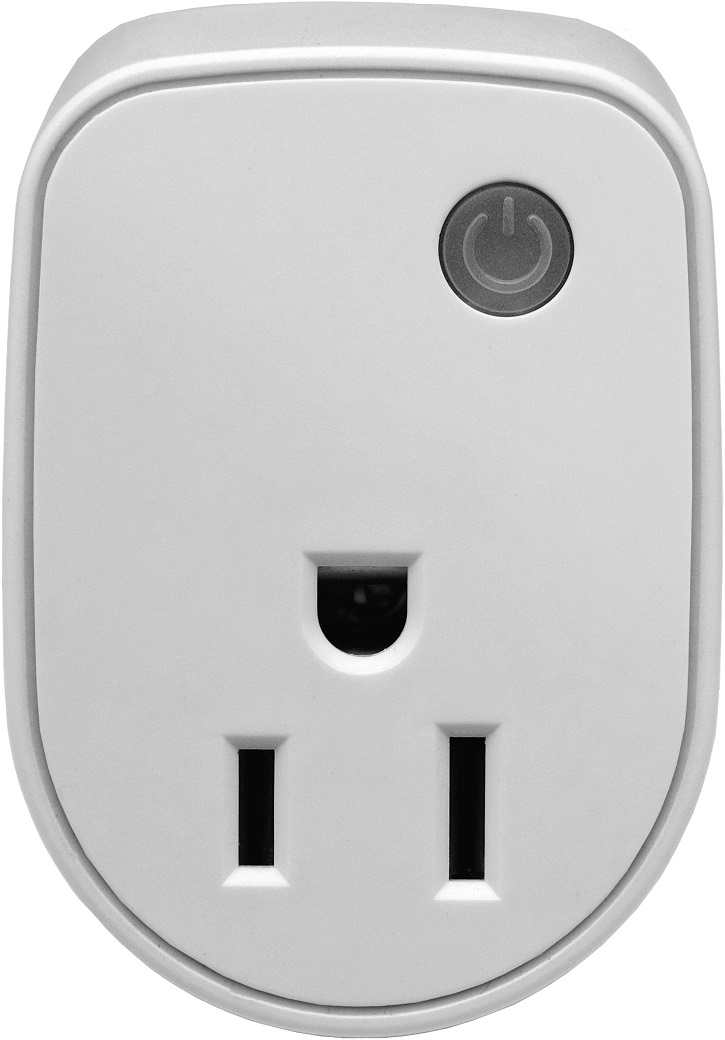
This plug-in ON/OFF switch PAN15 is a security enabled wireless switch, based on Z-Wave Plus technology. Z-Wave PlusTM enabled devices displaying the Z-Wave PlusTM logo can also be used with it regardless of the manufacturer, and can also be used in other manufacturer’s Z-WaveTM enabled networks. Remote On/Off control of the connected load is possible with other manufacturer’s wireless Controller. Each switch is designed to act as a repeater. Repeaters will re-transmit the RF signal to ensure that the signal is received by its intended destination by routing the signal around obstacles and radio dead spots. Because PAN15 supports Security Command Class, it can learn with Secured controller. Its functionality and supported command classes is identical when included as a secure and non-secure device. This plug-in ON/OFF switch is able to detect instance wattage (1560W/UL/TW/JP) and overload current (14.5A) of connected lights or appliances. When detecting overload state, the Switch will be disabled and its On/Off button will be lockout of which LED will flash quickly. However, unplug and re-connect the switch will reset its overload condition to normal status. Adding to Z-WaveTM Network In the front casing, there is an On/Off button with LED indicator which is used to toggle switch on and off or carry out inclusion, exclusion, reset or association. When first power is applied, its LED flashes on and off alternately and repeatedly at 0.5 second intervals. It implies that it has not been assigned a node ID and start auto inclusion. Auto Inclusion The function of auto inclusion will be executed as long as the switch does not have Node ID and just plug the switch into a wall outlet. Note: Auto inclusion timeout is 2 minute during which the node information of explorer frame will be emitted once several seconds. Unlike “inclusion” function as shown in the table below, the execution of auto inclusion is free from pressing the On/Off button on the Switch. The table below lists an operation summary of basic Z-Wave functions. Please refer to the instructions for your Z-WaveTM Certificated Primary Controller to access the Setup function, and to include/exclude/associate devices
Want to buy adds it to your wish list and follows Philio for updates. I own it adds it to your collection.
This plug-in ON/OFF switch PAN15 is a security enabled wireless switch, based on Z-Wave Plus technology. Z-Wave PlusTM enabled devices displaying the Z-Wave PlusTM logo can also be used with it regardless of the manufacturer, and can also be used in other manufacturer’s Z-WaveTM enabled networks. Remote On/Off control of the connected load is possible with other manufacturer’s wireless Controller. Each switch is designed to act as a repeater. Repeaters will re-transmit the RF signal to ensure that the signal is received by its intended destination by routing the signal around obstacles and radio dead spots. Because PAN15 supports Security Command Class, it can learn with Secured controller. Its functionality and supported command classes is identical when included as a secure and non-secure device. This plug-in ON/OFF switch is able to detect instance wattage (1560W/UL/TW/JP) and overload current (14.5A) of connected lights or appliances. When detecting overload state, the Switch will be disabled and its On/Off button will be lockout of which LED will flash quickly. However, unplug and re-connect the switch will reset its overload condition to normal status. Adding to Z-WaveTM Network In the front casing, there is an On/Off button with LED indicator which is used to toggle switch on and off or carry out inclusion, exclusion, reset or association. When first power is applied, its LED flashes on and off alternately and repeatedly at 0.5 second intervals. It implies that it has not been assigned a node ID and start auto inclusion. Auto Inclusion The function of auto inclusion will be executed as long as the switch does not have Node ID and just plug the switch into a wall outlet. Note: Auto inclusion timeout is 2 minute during which the node information of explorer frame will be emitted once several seconds. Unlike “inclusion” function as shown in the table below, the execution of auto inclusion is free from pressing the On/Off button on the Switch. The table below lists an operation summary of basic Z-Wave functions. Please refer to the instructions for your Z-WaveTM Certificated Primary Controller to access the Setup function, and to include/exclude/associate devices
Hardware platform
SD3502
Short description
This plug-in ON/OFF switch PAN15 is a security enabled wireless switch, based on Z-Wave Plus technology. The plug-in ON/Off switch is able to detect current wattege and overload wattage of connected light or appliances.
Association groups
Group Number Maximum Nodes Supported End Point ID Description 1
Product identifier
PAN15-1
Countries / regions
United States of America
Certification number
ZC10-16010002
Configuration parameters
Parameter Number Name Description Format Size Min Value Max Value Default Value Parameter Values 6
Supports explorer frames
Yes
From to description 0 0 0 : disable 1 1 1 : enable 7 led indication mode 1. show switch state:when switch is on, led is on. when switch is off, led is off. the default setting is show switch state. 2. show night mode:when switch is on, led is off. when switch is off, led is on. 0 1 0 0 1 from to description 1 1 1 : show switch state 2 2 2 : show night mode 8 auto off timer whenever pan15 switches to on, the auto off timer begin to count down. after the timer decrease to zero, it will switch to off automatically. however if auto off timer is set as 0, the auto off function will be disabled. the default setting is 0. 0 2 0 0 0 from to description 0 0 0 : disable auto off function 1 32767 1 0x7 fff : 1s ~ 32767s 11 switch status report mode whenever the status of switches changes, it will send a binary switch report to the group1 node. the default setting is 1 (enable). 0 1 0 0 1 from to description 0 0 0 : disable 1 1 1 : enable 4 threshold of kwh for load caution this is a warning when the kwh of load over the preset threshold value, if the setting value is 10000, when the accumulated power consumption of relay1 over this value, pan15 will send kwh meter report to warn the group1 node, minimum value is 1 kwh and default value is 10000 k wh. 0 2 0 0 10000 from to description 1 10000 10000*1 kwh=10000 kwh 5 restore switch state mode whenever the ac power return from lost, pan15 will restore the switch state which could be switch off、last switch state、switch on. the default setting is last switch state. 0 1 0 0 1 from to description 0 0 0 : switch off 2 2 2 : switch on 1 1 1 : last switch state 1 watt meter report period if the setting is configured for 1hour (set value =720), the pan15 will report its instant power consumption every 1 hour to group1 node. the maximum interval to report its instant power consumption is 45 hours (5s*32767/3600=45hr). 0 2 0 0 720 from to description 1 32767 720*5s=3600s=1 hour 3 threshold of current for load caution this is a warning when the current of load over the preset threshold value, if the setting value is 1300, when the load current of relay1 over this value, pan15 will send current meter report to warn the group1 node, the range of the setting value is from 10 to 1300,and the default value is 1300. 0 2 0 0 1300 from to description 10 1300 1300*0.01 a = 13 a 2 kwh meter report period if the setting is configured for 1hour (set value =6), the pan15 will report its accumulated power consumption (kw/h) every 1 hour to group1 node. the maximum interval to report its accumulated power consumption (kw/h) is 227.55 days (10min*32767/1440=227.55 days). 0 2 0 0 6 from to description 1 32767 6*10min=1 hour 9 rf off command mode whenever a switch off command, basic set、binary switch set、switch all off, is received, it could be interpreted as 4 variety of commands. 1. switch off:it switches to off state. the default setting is switch off. 2. ignore:the switch off command will be ignored. 3. switch toggle:it switches to the inverse of current state. 4. switch on:it switches to on state. 0 1 0 0 0 from to description 0 0 0 : switch off 1 1 1 : ignore 2 2 2 : switch toggle 3 3 3 : switch on texts