✅ Future-proofBuilt to keep working — even if the maker walks away.
It works locally over Z-Wave, so it keeps running even if HELTUN shuts down the app or the servers. Nothing here ties you to a single company's survival.
Works locally over Z-Wave — keeps running without the maker's cloud
Still in production
Based on how this device connects (local vs. cloud), whether it’s still sold and supported, and its app / subscription. A guide, not a guarantee.
Connectivity
Z-Wave
Prices
No prices yet — be the first to add one.
Community tags
Be the first to tag this page — tags appear right away. Try a theme, capability, or subject (e.g. WWII, heist, slow burn, time travel, A24).
Community photos
Photos from members
No member photos yet.
Reviews
What members say
Sign in to rate Relay Switch Quinto and share a photo.
No reviews yet.
Community
Be the first to start a thread about Relay Switch Quinto
Threads post into the HELTUN community forum.
Sign in to start a thread in the HELTUN community.
Edit history
Loading edit history…
Certified
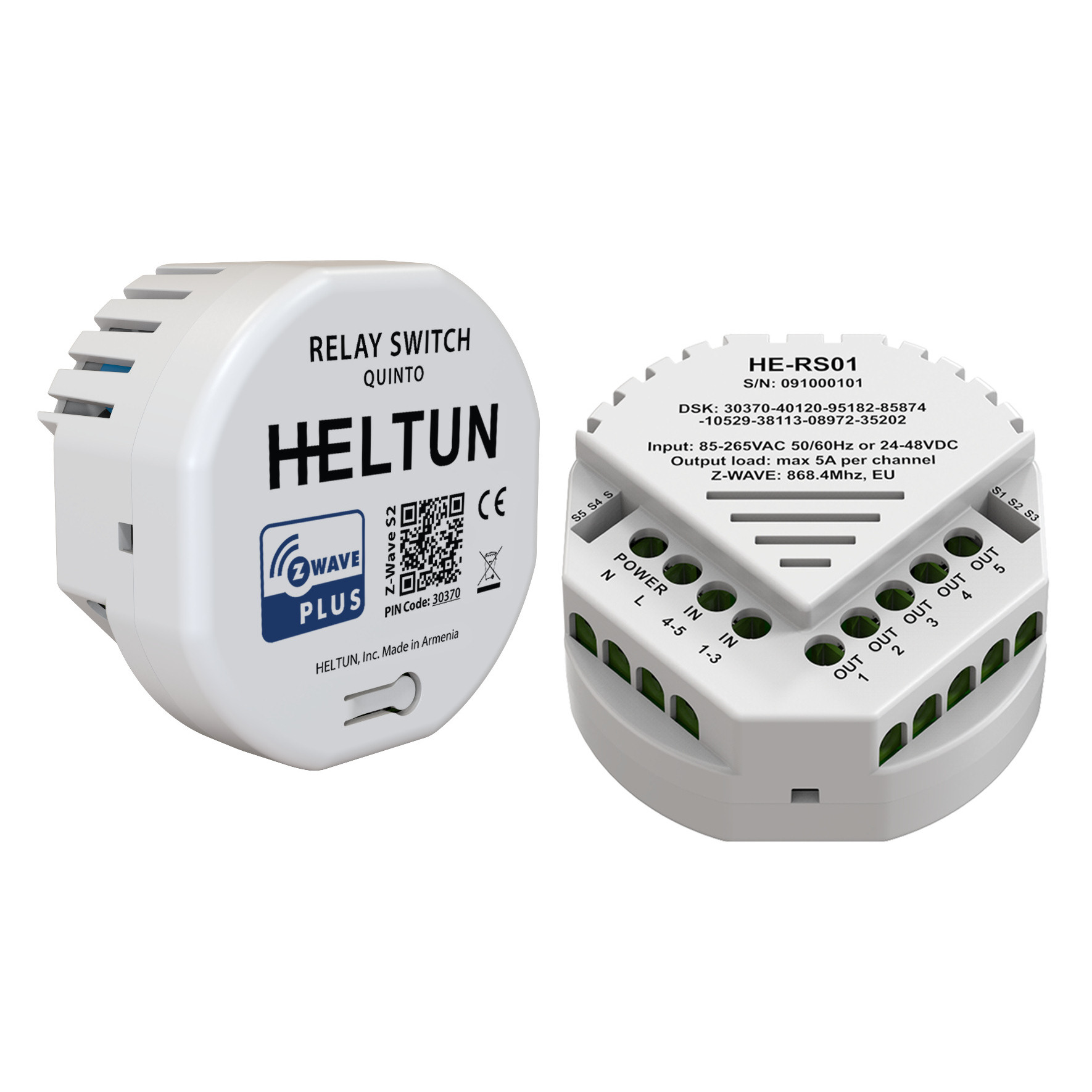
The HELTUN HE-RS01 is an advanced programmable Z-Wave Plus v2 in-wall relay switch that controls many devices, including lights, dimmers, blinds, curtains, door locks, gates, motorized valves, roller shutters, and more. Features: • Five-channel 5-amp relays with dry contact inputs • Each relay may be controlled by a timer or on a week schedule • Power Consumption logic monitors energy usage • 10 association groups • Incorporates HELTUN Advanced Zero-Cross Technology The HELTUN HE-RS01 is part of an entire line of smart, connected products designed to provide the best technology has to offer without compromising stylish living.
Want to buy adds it to your wish list and follows HELTUN for updates. I own it adds it to your collection.
The HELTUN HE-RS01 is an advanced programmable Z-Wave Plus v2 in-wall relay switch that controls many devices, including lights, dimmers, blinds, curtains, door locks, gates, motorized valves, roller shutters, and more. Features: • Five-channel 5-amp relays with dry contact inputs • Each relay may be controlled by a timer or on a week schedule • Power Consumption logic monitors energy usage • 10 association groups • Incorporates HELTUN Advanced Zero-Cross Technology The HELTUN HE-RS01 is part of an entire line of smart, connected products designed to provide the best technology has to offer without compromising stylish living.
Hardware platform
ZGM130
Short description
Advanced Programmable Z-Wave Plus v2 In-Wall Relay Switch—with S2 security and SmartStart on the Z-Wave 700 platform.
Product identifier
HE-RS01
Countries / regions
Australia, China, Hong Kong, India, Israel, Japan, Russian Federation, Republic of Korea, United States of America, European Union
Supports smart start
Yes
Certification number
ZC12-20040046
Radio range z wave (m)
40
Configuration parameters
Parameter Number Name Description Format Size Min Value Max Value Default Value Parameter Values 1
Supports explorer frames
Yes
Supported command classes
Identifier Name Key Version COMMAND_CLASS_CONFIGURATION_V4
Supported / controlled meter types
Meter Type Rate Type Description Electric meter
Value dry contact z wave scene type value central scene firmware updatable value updatable by consumer by rf switch load capacity current value 5x5 a association groups
Group Number Maximum Nodes Supported End Point ID Group Name Profile Description 2
From to description 0 0 switch off auto correction 1 0 if tps05 is connected to a z wave gateway, the time and day will be periodically polled and corrected from the gateway 2 weekday the day of the week (starting from monday) 3 1 1 7 1 from to description 1 0 monday 2 0 tuesday 3 0 wednesday 4 0 thursday 5 0 friday 6 0 saturday 7 0 sunday 3 hour time hour 2 1 0 23 0 from to description 0 23 time hour in 24 hour format 4 minute time minute 2 1 0 59 0 from to description 0 59 manual adjustment of time minutes (60 minutes) 5 meter report interval energy consumption meter consecutive report interval, minutes 2 1 1 120 10 from to description 1 120 energy consumption meter consecutive report interval in minutes 6 relay1 control source relay 1 control source 2 1 0 5 1 from to description 0 0 controlled by gateway or associated device 1 1 controlled by touch button n1 (top left) 2 2 controlled by touch button n2 (top right) 3 3 controlled by touch button n3 (bottom left) 4 4 controlled by touch button n4 (bottom right) 5 5 controlled by touch button n5 (center) 7 relay2 control source relay 2 control source 2 1 0 5 2 from to description 0 0 controlled by gateway or associated device 1 1 controlled by touch button n1 (top left) 2 2 controlled by touch button n2 (top right) 3 3 controlled by touch button n3 (bottom left) 4 4 controlled by touch button n4 (bottom right) 5 5 controlled by touch button n5 (center) 8 relay3 control source relay 3 control source 2 1 0 5 3 from to description 0 0 controlled by gateway or associated device 1 1 controlled by touch button n1 (top left) 2 2 controlled by touch button n2 (top right) 3 3 controlled by touch button n3 (bottom left) 4 4 controlled by touch button n4 (bottom right) 5 5 controlled by touch button n5 (center) 9 relay4 control source relay 4 control source 2 1 0 5 4 from to description 0 0 controlled by gateway or associated device 1 1 controlled by touch button n1 (top left) 2 2 controlled by touch button n2 (top right) 3 3 controlled by touch button n3 (bottom left) 4 4 controlled by touch button n4 (bottom right) 5 5 controlled by touch button n5 (center) 10 relay5 control source relay 5 control source 2 1 0 5 5 from to description 0 0 controlled by gateway or associated device 1 1 controlled by touch button n1 (top left) 2 2 controlled by touch button n2 (top right) 3 3 controlled by touch button n3 (bottom left) 4 4 controlled by touch button n4 (bottom right) 5 5 controlled by touch button n5 (center) 11 hold1 control mode hold control mode for touch button 1 2 1 0 3 1 from to description 0 0 hold function is disabled 1 1 operate like click 3 3 when the button is held the relay output state is off, as soon as the button is released the relay output state changes to on (momentary switch). 2 2 when the button is held the relay output state is on, as soon as the button is released the relay output state changes to off (momentary switch). 17 click2 control mode click control mode for touch button 2 2 1 0 6 1 from to description 0 0 click function disabled 1 1 relay inverts state (toggles on to off, off to on). 2 2 relay inverts state (toggles on to off, off to on) according to the button backlight state. 3 3 relay switches to on state only. 4 4 relay switches to off state only. 5 5 timer: on>off mode: relay output switches to on state (contacts are closed) then after a specified time switches back to off state (contacts are open). the time is specified in parameters 35 39. 6 6 timer: off>on mode: relay output switches to off state (contacts are open) then after a specified time switches back to on state (contacts are closed). the time is specified in parameters 35 39. 23 relay3 timer duration timer mode duration for button 3. this parameter specifies the duration in seconds for the timer mode (value 5 or 6 in parameters 32). press the button and the relay output goes to on/off for the specified time then changes back to off/on. this function can be used to open/close garage doors, blinds, curtains, etc. or to turn attached devices like security off for a short time. the time values can be configured from 0 to 43200 sec (12 hours). note: if the parameter value is set to “0” it will operate as a short contact (about 0.5 sec). 2 2 0 43200 0 from to description 0 43200 timer mode duration in seconds 25 relay5 timer duration timer mode duration for button 5. this parameter specifies the duration in seconds for the timer mode (value 5 or 6 in parameters 34). press the button and the relay output goes to on/off for the specified time then changes back to off/on. this function can be used to open/close garage doors, blinds, curtains, etc. or to turn attached devices like security off for a short time. the time values can be configured from 0 to 43200 sec (12 hours). note: if the parameter value is set to “0” it will operate as a short contact (about 0.5 sec). 2 2 0 43200 0 from to description 0 43200 timer mode duration in seconds 31 relay control scenario1 relays control by sensors group 1 0, 10000000 … 53112359 encoded as 8 digit value (abcdefgh): a: relay number (1.. 5) b: control mode (0 temperature sensor, 1 humidity sensor, 2 light sensor, 3 time control) c: state change condition relative to the value in hgfe value field ( 0 lower than, 1 higher than) d: state change, 0 switch off, 1 switch on efgh: condition value sensor value for control modes 0 2 time of day for control mode 3. ef represents hour (0..23), gh represents minutes (0..59) 2 4 0 53112359 0 from to description 0 0 scenario function is disabled 1 53112359 behavior according to the encoded scenario 43 relay3 load power power load consumption (in watts) relay channel 3 in order to calculate total energy consumption relative to the time each relay is on. 2 2 0 1100 0 from to description 0 1100 power load consumption (in watts) 44 relay4 load power power load consumption (in watts) relay channel 4 in order to calculate total energy consumption relative to the time each relay is on. 2 2 0 1100 0 from to description 0 1100 power load consumption (in watts) 45 relay5 load power power load consumption (in watts) relay channel 5 in order to calculate total energy consumption relative to the time each relay is on. 2 2 0 1100 0 from to description 0 1100 power load consumption (in watts) 46 s1 association mode associations mode for external input s1 . these parameters are intended for use when multilevel switch group associations (groups 3, 5, 7, 9 & 11) have been activated. they define the logic of values changing if one of the buttons on switch connected to external inputs s1 s5 has been held for more than one second. 3 1 0 2 0 from to description 0 0 on each hold event, “up (brighten)” and “down (dim)” command will be alternately sent to associated devices. 1 0 on each hold event, the “up (brighten)” command will be sent to associated devices. 2 0 on each hold event, the “down (dim)” command will be sent to associated devices. 49 s4 association mode associations mode for external input s4. these parameters are intended for use when multilevel switch group associations (groups 3, 5, 7, 9 & 11) have been activated. they define the logic of values changing if one of the buttons on switch connected to external inputs s1 s5 has been held for more than one second. 3 1 0 2 0 from to description 0 0 on each hold event, “up (brighten)” and “down (dim)” command will be alternately sent to associated devices. 1 0 on each hold event, the “up (brighten)” command will be sent to associated devices. 2 0 on each hold event, the “down (dim)” command will be sent to associated devices. 48 s3 association mode associations mode for external input s3. these parameters are intended for use when multilevel switch group associations (groups 3, 5, 7, 9 & 11) have been activated. they define the logic of values changing if one of the buttons on switch connected to external inputs s1 s5 has been held for more than one second. 3 1 0 2 0 from to description 0 0 on each hold event, “up (brighten)” and “down (dim)” command will be alternately sent to associated devices. 1 0 on each hold event, the “up (brighten)” command will be sent to associated devices. 2 0 on each hold event, the “down (dim)” command will be sent to associated devices. 47 s2 association mode associations mode for external input s2. these parameters are intended for use when multilevel switch group associations (groups 3, 5, 7, 9 & 11) have been activated. they define the logic of values changing if one of the buttons on switch connected to external inputs s1 s5 has been held for more than one second. 3 1 0 2 0 from to description 0 0 on each hold event, “up (brighten)” and “down (dim)” command will be alternately sent to associated devices. 1 0 on each hold event, the “up (brighten)” command will be sent to associated devices. 2 0 on each hold event, the “down (dim)” command will be sent to associated devices. 50 s5 association mode associations mode for external input s5. these parameters are intended for use when multilevel switch group associations (groups 3, 5, 7, 9 & 11) have been activated. they define the logic of values changing if one of the buttons on switch connected to external inputs s1 s5 has been held for more than one second. 3 1 0 2 0 from to description 0 0 on each hold event, “up (brighten)” and “down (dim)” command will be alternately sent to associated devices. 1 0 on each hold event, the “up (brighten)” command will be sent to associated devices. 2 0 on each hold event, the “down (dim)” command will be sent to associated devices. 42 relay2 load power power load consumption (in watts) relay channel 2 in order to calculate total energy consumption relative to the time each relay is on. 2 2 0 1100 0 from to description 0 1100 power load consumption (in watts) 24 relay4 timer duration timer mode duration for button 4. this parameter specifies the duration in seconds for the timer mode (value 5 or 6 in parameters 33). press the button and the relay output goes to on/off for the specified time then changes back to off/on. this function can be used to open/close garage doors, blinds, curtains, etc. or to turn attached devices like security off for a short time. the time values can be configured from 0 to 43200 sec (12 hours). note: if the parameter value is set to “0” it will operate as a short contact (about 0.5 sec). 2 2 0 43200 0 from to description 0 43200 timer mode duration in seconds 54 reserved parameter reserved by the manufacturer. setting this parameter will have no impact on dut functionality. 2 1 0 1 0 from to description 0 1 parameter reserved by the manufacturer. setting this parameter will have no impact on dut functionality. 55 reserved parameter reserved by the manufacturer. setting this parameter will have no impact on dut functionality. 2 1 0 1 0 from to description 0 1 parameter reserved by the manufacturer. setting this parameter will have no impact on dut functionality. 41 relay1 load power power load consumption (in watts) relay channel 1 in order to calculate total energy consumption relative to the time each relay is on. 2 2 0 1100 0 from to description 0 1100 power load consumption (in watts) 51 reserved parameter reserved by the manufacturer. setting this parameter will have no impact on dut functionality. 2 1 0 1 0 from to description 0 1 parameter reserved by the manufacturer. setting this parameter will have no impact on dut functionality. 52 reserved parameter reserved by the manufacturer. setting this parameter will have no impact on dut functionality. 2 1 0 1 0 from to description 0 1 parameter reserved by the manufacturer. setting this parameter will have no impact on dut functionality. 53 reserved parameter reserved by the manufacturer. setting this parameter will have no impact on dut functionality. 2 1 0 1 0 from to description 0 1 parameter reserved by the manufacturer. setting this parameter will have no impact on dut functionality. 56 reserved parameter reserved by the manufacturer. setting this parameter will have no impact on dut functionality. 2 1 0 1 0 from to description 0 1 parameter reserved by the manufacturer. setting this parameter will have no impact on dut functionality. 57 reserved parameter reserved by the manufacturer. setting this parameter will have no impact on dut functionality. 2 1 0 1 0 from to description 0 1 parameter reserved by the manufacturer. setting this parameter will have no impact on dut functionality. 58 reserved parameter reserved by the manufacturer. setting this parameter will have no impact on dut functionality. 2 1 0 1 0 from to description 0 1 parameter reserved by the manufacturer. setting this parameter will have no impact on dut functionality. 59 reserved parameter reserved by the manufacturer. setting this parameter will have no impact on dut functionality. 2 1 0 1 0 from to description 0 1 parameter reserved by the manufacturer. setting this parameter will have no impact on dut functionality. 60 reserved parameter reserved by the manufacturer. setting this parameter will have no impact on dut functionality. 2 1 0 1 0 from to description 0 1 parameter reserved by the manufacturer. setting this parameter will have no impact on dut functionality. texts